
The options for high availability can get confusing. I was lucky enough to begin working with SQL Server clusters early in my career, but many people have a hard time finding simple information on what a cluster does and the most common gotchas when planning a cluster.
Today, I’ll tell you what clusters are, what they’re good for, and why I like to plan out my clusters in a very specific way. I’ll also give an overview of how clustering relates to the AlwaysOn Availability Groups feature in SQL Server 2012, and wrap up with frequently asked questions about clustering SQL Server.
What Type of SQL Clustering are we Talking About?
There are lots of types of clusters out there. When we cluster SQL Server, we install one or more SQL Server instances into a Windows Failover Cluster. In this post I’m talking specifically about clustering SQL Server 2005 or later using Windows Server 2008 or later.
Key Concept: A Windows Failover Cluster uses shared storage– typically, this shared storage is on a SAN. When a SQL Server instance is installed on the cluster, system and user databases are required to be on the shared storage. That allows the cluster to move the SQL instance to any server (or “node”) in the cluster whenever you request, or if one of the nodes is having a problem. There is only one copy of the data, but the network name and SQL Server service for the instance can be made active from any cluster node.
Translation: A failover cluster basically gives you the ability to have all the data for a SQL Server instance installed in something like a share that can be accessed from different servers. It will always have the same instance name, SQL Agent jobs, Linked Servers and Logins wherever you bring it up. You can even make it always use the same IPAddress and port– so no users of the SQL Server have to know where it is at any given time.
Here is a diagram of a SQL Server cluster. The cluster is named SQLCLUSTER01. It has two nodes (servers), which are named SQLCLU01NODE01 and SQLCLU01NODE02. People connect to the SQL Server instance at SQLCLU01A\SQL. The instance has been configured on port 1433.
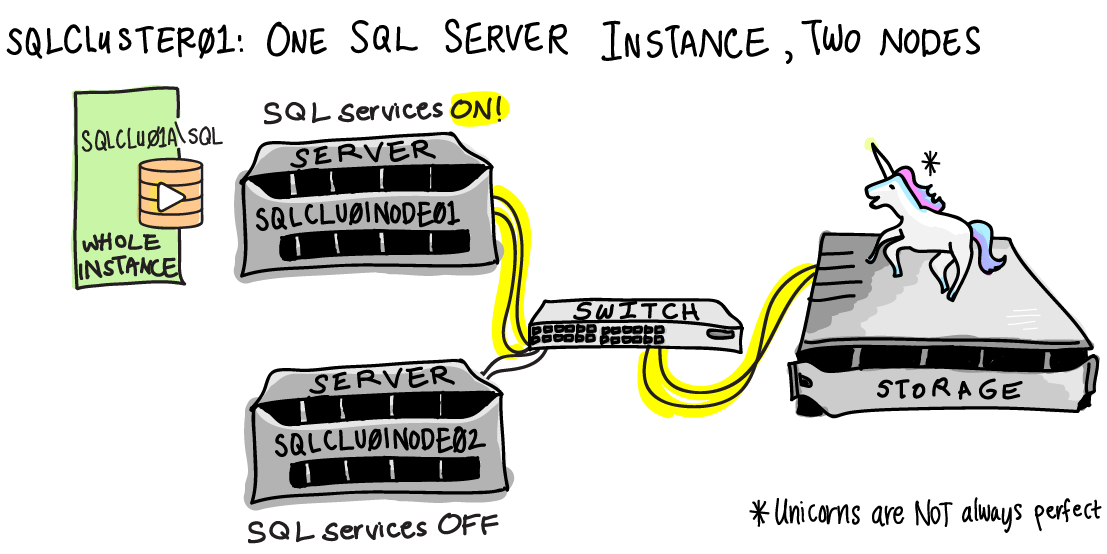
Oh no! There’s been a failure in our environment!
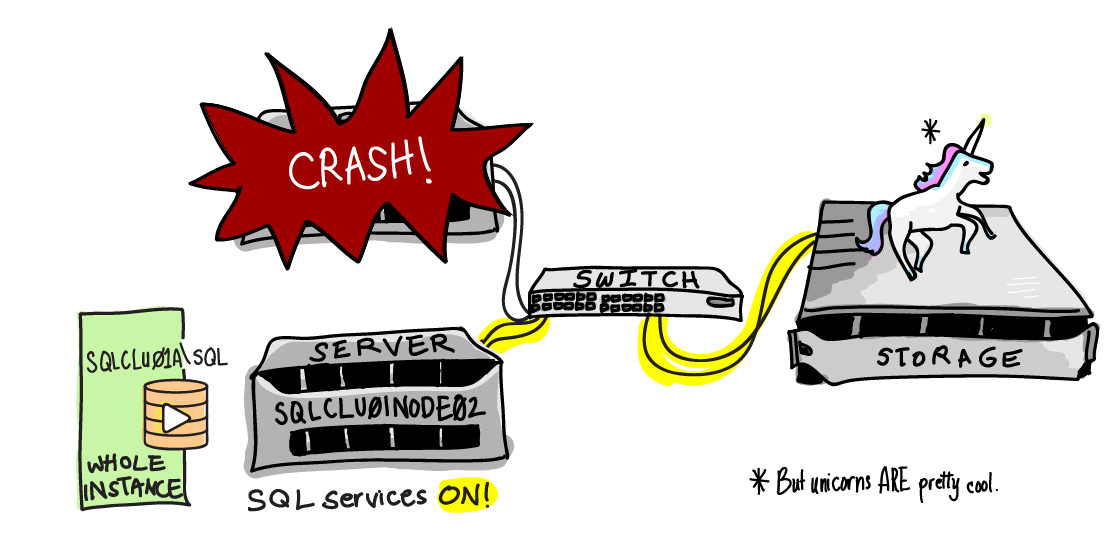
Here’s what happened.
The SQLCLU01NODE01 server crashed unexpectedly. When this happened, the Windows Failover Cluster service saw that it went offline. It brought up the SQL Server services on SQLCLU01NODE02. The SQLCLU01A\SQL instance started up and connected to all the same databases on the shared storage– there’s one copy of the data, and it doesn’t move. As part of the SQL Server startup, any transactions that were in flight and had not committed at the time of the crash were rolled back.
While this automatic failover was occurring, users could not connect to the SQLCLU01A\SQL instance. However, after it came back up they were able to resume operations as normal, and had no idea that a server was still offline.
Why You Care About SQL SERVER Clustering
If you’re a business owner, manager, or DBA, you care about clustering because it helps keep your applications online more of the time— when done properly, it makes your database highly available.
Here are some ways that clustering makes your life easier:
- Hardware failures are a nightmare on standalone servers. If a server starts having problems in a failover cluster, you can easily run your SQL Server instance from another node while you resolve the issue.
- Applying security patches on a standalone server can be very tedious and annoying to the business: the SQL Server is offline while you wait for the server to reboot. By using failover clustering, you can apply patches with only brief downtimes for your application as you move your SQL Server instance to a different node.
- Failover clusters can also give you an additional tool in your troubleshooting toolkit. Example: if you start seeing high latency when using storage and you’ve ruled out all the immediate candidates, you can fail to another node to try to rule out if it’s a problem with a per-node component like an HBA.
- Clustering is transparent to the calling application. Lots of things with SQL Server “just work” with clustering, whereas they’re a little harder with other alternatives. With clustering, all of my databases, logins, agent jobs, and everything else that’s in my SQL Server instance fail over and come up together as a single unit— I don’t have to script or configure any of that. I can also cluster my distributed transaction coordinator and fail it over with my instance as well.
Gotchas and Notes for Planning a SQL Cluster
Know What Clustering SQL Server Doesn’t Do
The first gotcha is to be aware of what a failover cluster won’t help you with.
Clustering won’t improve your performance, unless you’re moving to more powerful servers or faster storage at the same time you implement clustering. If you’ve been on local storage, don’t assume moving to a SAN means a nirvana of performance. Also, clustering doesn’t guarantee that everything involved in your SAN is redundant! If your storage goes offline, your database goes too.
Clustering doesn’t save you space or effort for backups or maintenance. You still need to do all of your maintenance as normal.
Clustering also won’t help you scale out your reads. While a SQL Server instance can run on any node in the cluster, the instance is only started on one node at a time. That storage can’t be read by anyone else on the cluster.
Finally, clusters won’t give you 100% uptime. There are periods of downtime when your SQL Server instance is “failing over”, or moving between nodes.
Invest Time Determining the Right Naming Convention
You have a lot of names involved in a cluster: a name for the cluster itself, names for each of the servers in the cluster, and names for each SQL instance in the cluster. This can get confusing because you can use any of these names later on when connecting with Remote Desktop– so if you’re not careful, there may be times when you’re not entirely sure what server you’re logged onto! I have two general rules for naming:
First, make sure it’s obvious from the name what type of component it is– whether it’s a cluster, physical server, a SQL Server instance, or a Distributed Transaction Coordinator. I also recommend installing BGINFO to display the server name on the desktop for every server in the cluster.
Second, name everything so that if you later add further nodes or install another SQL Server instance onto the cluster, the names will be consistent.
Avoid Putting Too Many Nodes in One SQL Cluster
I prefer to have only two or three nodes in a cluster. For example, if I need to cluster five SQL Server instances, I would put them in two failover clusters.
This requires a few extra names and IP Addresses overall, but I prefer this for management reasons. When you apply patches or upgrades, you must make sure that each service on your cluster runs on each node successfully after you’ve applied the change. Having a smaller cluster means you don’t need to fail your instance over as many times after a change.
Don’t Assume Your Applications Will Reconnect Properly After Failover
Even though your SQL Server instance will come up with the same network name and IPAddress (if not using DHCP), many applications aren’t written to continue gracefully if the database server goes offline briefly.
Include application testing with your migration to a failover cluster. Even though the application doesn’t know it’s talking to a cluster (it’s a connection string like any other), it may not reconnect after a failover. I worked with one application where everything worked fine after a failover, except web servers stopped writing their log data to a database because they weren’t designed to retry after a connection failure. The data was written asynchronously and didn’t cause any failures that impacted users, but the issue wasn’t noticed immediately and caused the loss of some trending data.
“Active Active” Can Be Useful
My ideal cluster layout to work with is a two node cluster with identical hardware and two SQL Server instances on it. This is commonly called “Active Active” clustering, but that term is technically a no-no. Officially this is called a “Multi-Instance Failover Cluster.” Not quite as catchy, is it?
Many people think the ideal situation is to put their most important SQL Server instance on a two node cluster and leave the second node ready, waiting, and idle. So, why do I want a second SQL Server instance?
I like to put my critical, heavy hitter database on one of those instances in the cluster. I then want to take a couple of less critical, less busy databases and put them on the second instance. The perfect examples are logging databases. There are two requirements for these databases: first, they can’t require a large amount of memory or processor use to run well, because I absolutely have to know that these two instances can run successfully at peak load on a single node if required. Second, the databases on the “quiet” instance shouldn’t cause the whole application to go offline if they aren’t available.
Why do I like having a “quiet” instance? Well, whenever I need to apply updates to Windows or SQL Server, this is the canary I send into the coal mine first. You can perform rolling upgrades with failover clusters, which is great. But it’s even better to know that the first instance you fail over onto an upgraded node won’t take absolutely everything down if it has a problem.
Notes: Because of licensing costs, this option won’t always be realistic. If you go this route you have to make sure everything can stay within SLA if it has to run on a single node at your busiest times– don’t overload that “quiet” instance!
Re-Evaluate your SQL Server Configuration Settings
Revisit your configuration settings as part of your planning. For example, on a multi-instance cluster, you use the minimum memory setting for SQL Server to configure how your instances will balance their memory usage if they are on the same node.
Do I Have to Use Clustering to Use Availability Groups in SQL Server 2012?
This is an interesting question– don’t let it confuse you. We have a very cool new feature called Availability Groups coming in SQL Server 2012, which does offer awesome scale-out read functionality. You’ll read in many places that it “requires Failover Clustering.”
This is true. In order to use the Availability Group feature in SQL Server 2012, the Failover Clustering feature must be enabled in Windows. If you’re using Windows Server 2008 or prior, this feature is only available in Datacenter and Enterprise edition of Windows Server, so that feature isn’t free. This feature is now included in Windows Server 2012 for all editions.
But wait, there’s a catch! Even though you’re enabling the Failover Cluster feature, you are NOT required to have shared storage to use Availability Groups. You have the option to use a Failover Cluster in an Availability Group, but you can also run your Availability Groups with entirely independent storage subsystems if you desire. The feature is required because no matter what, Availability Groups will use parts of the Failover Clustering feature to manage a virtual network name and IP Address.
Frequently Asked Questions for Clustering SQL Server
Q: Can I install every SQL Server component on my cluster?
A: Nope. SQL Server Integration Services is not “cluster-aware” and can’t fail back and forth with your cluster.
Q: How long does it take to fail over?
A: There are several factors to consider in failover time. There’s the time for the SQL Server Instance’s service to go down on one node, be initiated on another node, and start up. This time for instances to start and stop includes normal database recovery times. If you need to keep failovers within an SLA, you’ll want to test failover times in a planned downtime, but also estimate in how long failover might be if it happened at peak load.
Q: Can I cluster a virtualized server?
A: Yes, you can create failover clusters with virtual servers with VMware or Hyper-V, and install SQL Server into it. I think this is great for learning and testing, but I’m not crazy about this for production environments. Read more here.
Q: Why do you make such a big deal about the shared storage?
A: Because not everyone has robust shared storage available. You want to make sure you’re using shared storage that has redundancy in all the right places, because in a failover cluster shared storage is a single point of failure, no matter how magical the SAN seems. This also means that if your data is corrupted, it’s going to be corrupted no matter which node you access it from.
Q: What’s the minimum number of nodes in a failover cluster?
A: One. This is called a single-node cluster. This is useful for testing purposes and in case you have a two node cluster and need to do a work on a node. You can evict a node without destroying the cluster.
Q: Can I use geo-clustering for Disaster Recovery?
A: Yes, but it requires some fancy setup. Most SQL Server clusters are installed in the same subnet in a single datacenter and are suitable for high availability. If you want to look into multi-site clustering, “geo-clustering” became available with SQL Server 2008, and is being enhanced in SQL Server 2012. Note: you’ll need storage magic like SAN replication to get your Geo-cluster on.
Q: Does it matter which version of Windows I use?
A: Yes, it matters a lot. Plan to install your Windows Failover Cluster on the most recent version of Windows Server, and you need Enterprise or Datacenter edition. If you must use an older version of Windows, make sure it’s at least Server 2008 with the latest service packs installed. The Failover Clustering Component of Windows was rewritten with Server 2008, so if you run on older versions you’ll have fewer features and you’ll be stuck chasing old problems.
Q: What is Quorum?
A: Quorum is a count of voting members— a quorum is a way of taking attendance of cluster members who are present. The cluster uses a quorum to determine who should be online. Read more about quorum here.
Learn More about Clustering SQL Server
Check out our SQL Server clustering training page for more articles and videos.

339 Comments. Leave new
Ahh, so that’s what this tweet from you meant.
“@Kendra_Little: I’m dedicating the next 30 minutes to @MJSwart and @BrentO . I’m drawing a portrait of an EqualLogic.”
(BTW, I really like the long format).
Thanks, Michael. Right after I wrote it I found a post of advice on writing by David Ogilvy. One of the items is “never write anything longer than two pages.”
Well, maybe Ogilvy wouldn’t have read to the end, but I’m glad you like it!
Excellent post!
Can you elaborate a little bit on using the minimum memory setting to balance memory usage in a failover scenario? There is a lot of conflicting information out there on the best way to configure minimum and maximum memory settings in a Multi-Instance Failover Cluster.
Hi Kyle,
That’s a great question. The key is the way dynamic memory management works. I have had very good luck with multi-instance clusters when configuring the minimum memory values for the SQL Server instances.
The key is to make sure that the more important instances have the right minimum amount, and that your total possible sum of minimum values is not too high. In my experience my clusters have done a very good job of balancing memory after failovers when configured in this way. (Note that I’m just talking SQL Server 2005 and later here!)
Why doesn’t SQL Server always share memory well with other applications? Well, not all applications share memory in ways that work well with it! More information is here: http://msdn.microsoft.com/en-us/library/ms177455.aspx
Note: I do disagree with this link in one way. I personally prefer to always set a maximum server memory for SQL Server to keep memory space free outside of what that setting limits. That doesn’t actually represent ALL the memory that even SQL Server itself consumes, and I need to leave extra room for any agent jobs that may be running, backup copies, etc, as well as the OS.
As with any configuration change, I always recommend careful testing, change control, and verification for modifying memory settings. (I know, I know, but I have to say it. Settings are a big deal!)
Thanks for the reply.
I am currently testing a few different configurations in an attempt to allow less important instances to use any extra memory on each node during normal operation. At the same time, I want to make sure that the most important instances have the memory they need in a failover scenario.
Like you, I prefer to always set the maximum server memory. This is leading me towards making a job that runs on startup to determine which node the instance is on and adjust the max memory setting accordingly.
Excellent article. simple, elegant and educative!!!
But the cluster nodes with SQL server service is not active /active like the Oracle RAC, right?
Correct, that’s why the term “Active Active” is not technically correct here. This is a failover cluster. A failover can have more than one SQL Server instance installed on it, but they are separate instances using totally separate storage as I have designed it here.
SQL Server’s Availability Group feature that’s releasing with SQL Server 2012 allows readable secondaries– which is more like the feature you’re describing from Oracle RAC. Availability Groups can use the Failover Clustering feature in Windows, but they do more and different things.
Hi
the term crash is a little generic lol.
It depends on what the resource failure was, each resource has a set of policies (they differ between Windows 2003 and Windows 2008 clusters), if the resource restarts successfully no fail over will occur
Regards
Perry
Hi Perry,
That’s a very fair point– in the example I basically meant that the first node bluescreened. Or perhaps someone shut down the wrong server by accident. 🙂
Thanks for mentioning this about specific resource failures. It does absolutely matter what resource has failed, as well as the dependency tree that resource is part of.
Disaster recovery isn’t all that fancy to setup.
All that needs to happen is to have the remote cluster and the local cluster share a IP address space with additional NIC cards. There are easy ways to bridge subnets to accomodate this type of cluster failover for disaster recovery.
Most Network admins will not want to bridge subnets in this way which if memory serves would require layer 3 . You would be better to use different subnets which is now available in 2012. Otherwise, you only have SQL Server DR. If you loose the rest of your infrastructure, you would still be in trouble.
Wow, I am schooled. Thanks Kendra. This is very informative. I did not know about clustering and did not bother to surf about it until your writing appeared on my feed. I used to have an understanding that Mirroring is somehow similar to clustering. 🙂 But that’s totally not true.
Some inquiries:
1. On Mirroring, does it require human-intervention in order to make the Secondary SQL server to be active when the primary SQL server goes down?
2. T-Logging works good for me so far. I prefer to manual-restore the last 1-3 log files rather than automating it via a script. Any thoughts?
3. Do you know any reference(book, blog, etc…) that thoroughly compare sql server disaster plan?(clustering, mirroring, tlogging, etc…)
Thanks Kendra
Hi Lester,
Thanks for your comment! Mirroring and clustering are indeed quite different.
1. Mirroring does have an automatic failover option– it involves using synchronous mirroring and a witness.
2. Log shipping can be a great solution– it’s all about finding the solution that fits your own business correctly and meets the Recovery Point Objective (RPO) and Recovery Time Obective (RTO) that you need!
3. Brent did a great webcast comparing disaster recovery options. He gives an overview of different methods along with pros and cons of each one. Check it out here: https://www.brentozar.com/archive/2011/12/sql-server-high-availability-disaster-recovery-basics-webcast/
Thanks for the article, very timely. Can you explain a little more on your reluctance to cluster a virtualized server? We’re looking into doing just that; our first implementation of a cluster to boot, in a production environment.
Hey, I was just reading through now and noticed that this comment somehow got missed. Sorry about that! For future readers, Brent wrote about this here at: https://www.brentozar.com/archive/2012/09/why-your-sql-server-cluster-shouldnt-be-virtualized/
Hi Kendra,
Your Article is interesting.I am new in setting up DB. I have simple question may be silly but if I am trying to set multiple instances.
For example type of scenario is below,
I have server 1 with instances A and B and Server 2 with instances A and B also running and wanted both servers instances should be connected to one shared storage SAN( Configuration type I want both of them Active at same time).
Q1. Is it practically possible that both servers Instances will be active at the same time that is Instance A on Server 1 and 2 active and performing DB operations or in second situation one instance of A will be active at a given time and other one will wait for that instance to die before starting any operations this will become exact situation described above by you.
-> Then what will be the difference between the multiple instances active at same time with single instance that is applied across the servers where the one instance die and other one will start processing.
Q2. Is it possible to configure nodes with SQL instances to be set with priority that is Instance A should always run from server 1 if server 1 is available.
Q3. Which method do you prefer for back up and recovery. I have one very critical database which data cannot be lose in any situation. and three other Database they are important but a little data loss is affordable.
And if you have any helpful documentation available please provide links.
Please consider all my questions valid.
Thank you
Hello Kendra,
Do you think these recommended Heartbeat settings for Server 2003 should still be used in Server 2008 R2 clustering (http://support.microsoft.com/kb/258750)? This SQL 2008 R2 clustering page (http://msdn.microsoft.com/en-us/library/ms189910(v=sql.105).aspx) does reference the previous link but it’s strange to me that I can’t find any updated documentation for Server 2008 R2.
Great article by the way.
Robert
Robert – no, heartbeat networks are no longer required for Windows Server 2008.
Isn’t it still best practice to use a heartbeat network though?
Great question, Robert.
The best practice is now that a single networking component should not cause communication between cluster nodes to stop. But that does not have to be done by the use of a heartbeat network. The “public” and “private” concepts are gone for cluster networking communication in Server 2008+ — check out the “cluster communications” and “cluster creation” sections here: http://technet.microsoft.com/en-us/magazine/hh535729.aspx (The article is “Windows Server 2008 R2: Networking in Failover Clusters” by John Marlin.)
I also recommend this excellent three part series on cluster network communication in Server 2008 by Chuck Timon: http://blogs.technet.com/b/askcore/archive/2010/02/12/windows-server-2008-failover-clusters-networking-part-1.aspx
Thank you, Kendra. Those links are very helpful.
Robert
From searching online, it seems like most people still use a private network with Server 2008 even though it’s not required. Maybe they are just used to doing it from 2003 clustering so they keep doing it.
As you mentioned above and from the links you provided, the important thing is that you have redundancy. I’m in the process of implementing a new 2008 R2 cluster and would like to do it with one, fully redundant network. Although, if anything goes wrong with the cluster, I’m sure it will be blamed on me for not having a private network 🙂
I’ve responded to Brent’s blog post here
https://www.brentozar.com/archive/2012/06/everything-know-about-clustering-wrong/
That’s the primary reason I still use a private network for my cluster heartbeat communication. More often than not, redundancy is not being tested in network infrastructures during DR testing and exercises. If the network guys can guarantee via their design and testing that the network layer is redundant, that’s the time I’ll abandon the private network approach for the cluster heartbeat.
Kendra, wonderful post. I also watched Brent’s webcast. It was very informative.
I would like to set up a 2 node cluster (Windows server 2008R2), with 2 instances (different versions of SQL Server). We currently have one Windows server 2008R2 runnnig SQL Server 2008R2. We would like to setup a SQL Server 2012 instance on that same server. In the mean time, my boss would like for me to investigate clustering and/or mirroring for HA/DR. My only option at this time, because of cost considerations, is to have one other server to act as a second node in a separate data center. My questions are these:
1. Can I easily/without a lot of disruption make the stand-alone Windows server and SQL Server 2008R2 instance a 2 node cluster? Most things I’ve read speak to starting out from scratch and creating the 2 nodes.
2. If I set up the SQL Server 2012 instance as stand-alone, same question as above. I know this seems nonsensical but the installation of 2012 may need to happen well before the cluster is set up.
3. How do I make SSIS be HA? I know that SSIS is not cluster aware and the blogs I have read suggest using the file system versus MSDB to implement as HA.
4. SSRS? We do have some reports that are running on 2008R2. How can we implement reporting from two versions? I.e., does SSRS have to be set up both on 2008R2 and 2012? More to the point, my thought was to set up SSRS on 2012, import the old reports into 2012, then drop the 2008R2 version of SSRS. Thoughts on this?
Eventually we will be migrating the 2008R2 databases to 2012 (big bang – not over time), as soon as we can test everything. We can distribute the databases as a “quiet” and “noisy” instance over time as you have suggested.
Hi Tony,
Wow, those are great questions. The detail and volume in all the questions is more than I do justice to in the comments, so I’ll just hit one big point that I think will help you out.
When you install SQL Server, you have a choice to install it on a failover cluster using shared storage OR to install it as a standalone instance. They are different installs– and they work differently. You can’t flip a switch and take an instance from standalone to a failover cluster.
Now, things have become a big confusing in SQL 2012 because you can install SQL Server and then later enable Availability Groups, which require the node being in a Windows Cluster. But that’s using the Availability Group feature WITHOUT shared storage (ie without *failover* clustering).
Hope this is helps out.
Thanks,
Kendra
Hello Kendra,
Thanks for your response. If I understand you correctly, choosing to go with a Windows Cluster would require us to create a clustered install and then migrate the existing instance (or databases within the instance) to the newly created cluster. Is that correct?
In dev, I may attempt to setup a single node cluster and install a clustered instance on that node; migrate the databases to that instance; then go from there – i.e., see how that is going to affect the application connections to the instance.
Hello,
Just an assumption based on your question for SSIS. We are using a combinaison of environment variable and tech table for our connections string for ssis. We have 2 env variables, one that points the serveur, the second the database where our tech table is located. Every other configurations are stored into the tech table. In so, when we deploy a package on a server, it automaticaly uses the correct table for the connections and we don’t need to update the connections of all packages…
Assuming that the SSIS are deployed on the sql server (so in msdb) and are not aware of the switch, normally the packages should use the env variable located on the serveur they are running. So you could simply change the config from there and don’t touch the rest…
I could talk about it in a few weeks when we will implement a failover architecture. As for now, I’m just getting all the information needed to do my architecture proposal…
Hi,
On a 2 node active active cluster. Can both instance of sql server listen on the same default port of 1433? What happens when a node fails and both instance of sql servers on the same node ?
Thanks
Hi Raj,
Yes, both instances can have the same port, and it can be 1433. The instances will have totally separate IP addresses and virtual names, so they can come up on the same node and there’s no conflict. The combination of IP address and port is used to talk to the SQL Server instance, so they are actually still unique.
Note: Although multiple instances on a cluster can use port 1433, you can only have one ‘default’ instance on a SQL Server cluster. But you can set named instances to use port 1433.
Does a Windows 2008 r2 failover cluster “have” to have shared storage? I would like to set up a 2-node, geographically separated (read DR) cluster where each node uses it’s own SAN. The cluster nodes would be active-passive. I would use SAN replication to update the data from primary (prod) to backup (DR).
1) Is this a viable solution?
2) Is there something within Failover Cluster Manager or on the SQL Server 2012 installation that needs to be configured to allow/account this?
Hey Tony,
Technically speaking, SQL Server 2012 Availability Groups use the failover cluster feature, but don’t have to have SQL Server Failover Cluster Instances (which is what relies on shared storage)– they can use the Availability Groups feature to keep nodes in sync without any shared storage at all, and these can be in different geographic regions. You can also have failover clusters where SAN replication is used to synchronize the data in different regions.
Whether or not either of these are viable solutions for you is completely dependent on your environment, your applications and their bottlenecks, your team and resources, and lots of other details that you don’t want to put in comments on our blog. We help clients figure out those big strategy decisions in consulting engagements and the right answer is always specific for each client.
Question: I set up a SQL Server 2008 R2 Acive – Active cluster is into a network 10.100.x.x. and I have access to that network using a vpn from my LAN 192.168.x.x, but if I try to access any VIRTUAL IP or Cluster name it show me an error connection about instance name or network. How can I make the cluster accesible?
Hi Yasenka,
It could be quite a few things causing your error, and this sounds like a networking or firewall question more than something specific to the cluster. To help get to the bottom of your issue, I recommend you post the question on a site like http://serverfault.com/. Make sure to include details like the exact error message you’re getting, whether you’re able to ping the cluster IPs from the the LAN, etc.
Hi Kendra,
Finally I found the error and I want to share with all your the little experience. The customer network enviroment was the problem, due to a equipment disable to update ARP ( Router Eq.) with the Gratiotus ARP request by the cluster and the IPSec configuration that disable the tunnel after some time inactive.
So check these post :
http://support.microsoft.com/kb/244331
http://blogs.technet.com/b/askcore/archive/2009/02/13/what-is-a-microsoft-failover-cluster-virtual-adapter-anyway.aspx.
And is really important have the nodes equal hardware configuration, because the failover Cluster wizard can take any NIC and you can not take control of that.
Regards
What are my options today to make a failover cluster with independent arrays (1server + Storage) + (+ 1server Storage) and I need the disks synchronized between nodes?
Hi xagner,
If you’re talking local storage (or any storage without SAN synchronization), then it seems to me that your primary options would be either Database Mirroring (prior to SQL Server 2012) or Availability Groups (SQL Server 2012+).
However, neither of those options are technically failover clusters. Availability Groups use the Windows Failover cluster feature, but aren’t “Failover Cluster Instances.”
Not saying that to be nit-picky or anything, just trying to help map out the terminology for you because this is a very confusing area with the feature names and ability to mix and match.
Hope this helps!
In cluster setup ,can install two instances of sql server with same instance name ,but different virutal name?
Virutal_Name1\instance1
Virutal_Name2\instance1
Hi Sam,
The instance names also have to be unique. It’s a lot of names, isn’t it?
-kl
This was an awesome article on clustering! Thank you so much for the information!
Hi Kendra,
It’s a great article and would like to expand it further by asking, can I create a High Availability Group between 2 clustered SQL Servers?
The client wants to have multiple redundancy and plans to have SQL Server clustered in one location and another SQL Server cluster in another location as it’s secondary replica for HAGS.
Is this possible?
Thanks heaps!
Yes, we’ve implemented this for a client. The catch is that you’ll only get automatic failover inside the failover cluster, not to another replica. If you need to fail over from the primary cluster to any other replica, it’s a manual process.
I have a 2 node SQL 2008 R2 “Multi-Instance Failover Cluster” running 2 instances. Along with the 2 instances are 2 Distributed Transaction Coordinators, one assigned to each instance/node.
Failover is fine when I reboot a server in the cluster, but if I try to move one SQL instance to the other node, I get a DTC error indicating the cluster resource for DTC failed. I’ve tried moving the respective DTC first, but the along with the same error, the SQL instance on that node also will fail then. At that point I can wait a few seconds and retry the move or restart the DTC or SQL instance after the cluster indicates these items are moved but not started. Is it a dependency that I’m missing or is this expected when “manually” moving an instance?
Hi, Brian. It depends on how you’ve got DTC configured. It’s a little beyond what I can cover here in a comment, but I’d start with these resources:
https://blogs.msdn.com/b/cindygross/archive/2009/02/22/how-to-configure-dtc-for-sql-server-in-a-windows-2008-cluster.aspx?Redirected=true
http://www.sqlha.com/2012/06/29/how-to-properly-configure-dtc-for-clustered-instances-of-sql-server-with-windows-server-2008-r2/
Hi,
We’re trying to do backup on a two node SQL 2008 cluster using symantec 2012 and we want the backup traffic to redirect on to a dedicated network with a different IP. We could do backup of the database as we can see it on the server, but on the production network. But if we try to backup them via a dedicated IP we can not see it (the server and db). I’ve seen some post reg this, and they are suggesting that we put the backup network as a cluster resource, I just have no idea to do that.
Hi Renen,
You’re going to want to find instructions for your backup software for how to configure this. I quickly found instructions for how to configure this for Symantec Netbackup with a search– there’s steps related to the backup servers you have to take. From the SQL Server side, all it has to be able to do is connect to the virtual name of the instance successfully with the right permissions. Definitely get the full documentation from the vendor before changing things on your cluster: this is a common configuration and they should give you steps on exactly what to do.
Thanks for dispelling some of the mysteries around clustering, Kendra, clustering has always been something of a black-box those sysadmins know about…
Your answer to the “can I install all components” question was a firm “No!” on Integration Services. Being in the late stages of setting up a new Production cluster where we spent a decent length of time rearchitecting a serial-processing SP running as a 15-minutely job into a 10-thread parallel package on a 12 logical CPU server, I’m VERY concerned that this has been a colossal waste of time and effort… Given this is a core process and so far has been running extremely well on the active node, can you shine some light on how one can actually use SSIS on a cluster – SQL2012EE BTW – or does one need to bury one’s head in shame and re-architect the re-architected to NOT use SSIS…? Right now, if the package fails as a result of a failover, the job stops, then SQL Agent comes up and at the next scheduled time, runs the job again. The package leaves no partial updates and can be killed at will, hence my thinking that despite SSIS not being a clustered service, we would be OK to run this kind of package… I did check the “run stored procedures at service startup” option in SSMS to ensure the “dead” packages were reset.
Your wisdom is greatly appreciated by this accidental DBA. Thank you in advance.
Hey, Stephen,
This reply is probably too late for you, but for other readers it’s very tricky to make SSIS highly available. Here’s a blog post explaining the challenges and one workaround here:
http://blogs.technet.com/b/andrew/archive/2008/11/28/high-availability-integration-services-in-sql-server.aspx
Kendra
Sorry, meant BIDS, not SSMS for the “Integration Services Stored Procedure At SQL Server Startup checkbox” – my bad memory…
As per this (http://blogs.windows.com/windows_live/b/windowslive/archive/2009/12/22/a-peek-behind-the-scenes-at-hotmail.aspx) article, every cluster has its own storage.
” A cluster hosts millions of users (how many depends on the age of the hardware) and is a self-contained set of servers including: Frontend servers – Servers that that check for viruses and host the code that talks to your browser or mail client, using protocols such as POP3 and DeltaSync. Backend servers – SQL and file storage servers, spam filters, storage of monitoring- and spam data, directory agents and servers handling inbound and outbound mail. Load balancers – Hardware and software used to distribute the load more evenly for faster performance. ”
I am guessing which cluster the user gets assigned to is decided by your geography (ip address). In that case if I send myself an email from Germany and then check my email when I come to the US, I would be assigned to different clusters (hence different SQL databases). So for me to be able to see that email in the US, does it mean that all the databases in all the clusters are constantly synchronized?
Hi,
The word “cluster” is being used in a different sense in that article. It’s their term for referring to a large group of computers.
The multi-uses of the word “cluster” is a big cause for confusion in general. Windows Failover Clusters that hold SQL Servers are very different than Windows NLB Clusters, that you would use for something like IIS. And these are BOTH very different than clusters you would use on another operating system.
But in the case of the hotmail article it looks like the usage of the word is more like “Cluster Compute Group” — they’re just talking about a logical grouping of servers, not about a giant failover cluster with different types of applications on it.
In terms of what Hotmail currently uses as a backend, I have no idea! I would not be surprised if they were heavy users of Windows Azure, but I have no knowledge of whether or not that is the case.
This was an excellent article to read up on SQL Clustering. Gave me a boot in knowledge on Clustering with SQL.
Nice One
Kendra, Great Article.
I am a SW engineer that now has to setup a server so I am clueless. My first question is do you have any resources that show a diagram for Windows 2008 R2 virtualization, nodes, servers, etc.
Secondly, Can you have seperate virtualized servers on the same physical server and apply your same SQL Cluster01 schema? Basically given my limited resources I am trying to make 4 virtualized instances on one physical server: Web1 (instance 1) will failover to Web2 (instance 2) & DB 1 (instance 3) will failover to DB 2 (instance 4). So given clusters and nodes I am not sure how this would look. PS. I also am thinking of using instance 4 as a staging area to convert from SQL 2000 to 2008 <—yeah, I know.
Hi Kevin,
Regarding virtualization and clusters, I’d head on over and check out Brent’s blog post “Why Your SQL Server Cluster Shouldn’t Be Virtualized” here: https://www.brentozar.com/archive/2012/09/why-your-sql-server-cluster-shouldnt-be-virtualized/
Since we don’t recommend doing it, we haven’t provided a lot of guidance.
For your web servers, typically people implement IIS using NLB clusters, not failover clusters— although it is possible to integrate IIS boxes with failover clusters. As a very first step I would just make 100% sure what type of clustering you want to do for the web server boxes and which is the better fit, and if there’s a way you can achieve your availability goals without mixing failover clustering and virtualization.
Hope this helps!
Kendra
Hi,
When we have sql server virtual IP address to connect to sql server then what is the purpose of clusterip address? Can you please explain me
Hi Swaji,
The cluster is an entity itself– it has a cluster name. The cluster name has an associated object in Active Directory (CNO) that has an IP Address. The main reason that you need to know about this is that you don’t want to delete it or put it in a situation where the CNO can’t talk to a domain controller properly. To learn more, check out the CNO blog series here: http://blogs.technet.com/b/askcore/archive/2012/09/25/cno-blog-series-increasing-awareness-around-the-cluster-name-object-cno.aspx
For the purposes of using your clustered SQL Server, you want to use the virtual name for your SQL Server for your applications and queries. Any applications or users do not need to be aware of the cluster name object or its IP address.
Hi Kendra,
Thanks a lot….
Cluster Ip is only for cluster internal stuff and users will not be connecting to it all. Am I right??
And If user want to connect to that cluster Ip will the user be able to connect? If they connect what will they be able to see
What the user will see is a little complicated. Factors include where resources are located, what node things are on, what security the users have. You can play around and test it in a variety of configurations if you’re curious.
But how would users get the cluster name and IP in the first place? If you don’t publish it or advertise it, they typically would have no idea it exists!
Hi Brent Ozar..
Appriciated. But i hv one question. ie. am having some confusion reg mirroring vs clustering in mssql environement.
can u give idiea..
Sure, check out this video that explains the different high availability and disaster recovery options:
https://www.brentozar.com/archive/2011/12/sql-server-high-availability-disaster-recovery-basics-webcast/
I’d like to thank you for your nice post, i have a question regarding this and i really need urgent help if you please.
My company has an application server using SQL and they want to protect the production in case if a server fails by putting another server in remote location using VPN connection. is this solution possible, they don’t care about the budget they need a good solution.
Best,
the SQL we are using now is 2005 developer edition if we need to buy 2008 R2 or 2012 no problem, i have to do this by myself there is no option and i don’t have a good experience regarding this subject. so any info will be helpfull.
With My best regards,
Hi, Ahmed. Check out our video on the high availability and disaster recovery options for SQL Server:
https://www.brentozar.com/archive/2011/12/sql-server-high-availability-disaster-recovery-basics-webcast/
Great post Kendra, very informative.
I have a question regarding licensing. I downloaded the SQL 2012 Licensing Datasheet, however halfway through I was more confused then informed. My goal is to setup an environment similar to the one you have outlined – 2 nodes in a windows failover cluster, active active.
Regarding licensing – if I install SQL 2012 standard edition on my two servers will need any additional licensing to utilize the failover? My understanding is if install Windows Server 2008 Enterprise edition, enable Windows failover clustering, install SQL 2012 on my two servers that’s all I need. Does that sound about right or am I missing a step or component?
Thanks,
Hi Michael,
Licensing is super confusing– you’re not the only one.
In this case even the licensing *documents* are confusing. The SQL Server 2012 Licensing Datasheet indeed doesn’t answer your question. Instead, look to the SQL Server 2012 Licensing Guide here. There’s a section on high availability which starts on page 13 with detailed examples.
I’m not a licensing expert by any means, so giant disclaimer here, but in general the document explains that licensing exceptions only apply to a single passive node per licensed instance of SQL Server. Your use of the words “active active” implies that there are two SQL Server instances, one running on each node, so that would mean there is not a passive node, but I may be misunderstanding your comment. (The document goes into some detail about what’s meant by “passive” from the Microsoft licensing perspective, so that may be helpful.)
Hi,
can you please elebrate the differnce between 2005 and 2008 failover clusters
and steps for manual failover
Venkatesh – that’s kinda beyond something we can cover in a blog post comment. Your best bet is to pick up one of Allan Hirt’s books on SQL Server clustering and go from there.
Kendra/Brent,
I was re-reading this great article and saw below statement regarding windows editions which is not correct anymore in windows 2102. WSFC is included in Windows standard edition and you may want to modify the article accordingly.
“This is true. In order to use the Availability Group feature in SQL Server 2012, the Failover Clustering feature must be enabled in Windows. This feature is only available in Datacenter and Enterprise edition of Windows Server, so that feature isn’t free.”
DaniSQL – that’s absolutely correct, great catch! It has indeed changed in Windows Server 2012.
Is it possible if i would implement clustering with SQL Server 2008 R2 on two node with more than one instance. Are you willing to give step by step guidance.
Thank you.
Toms
Hi, Mr. Toms. For step-by-step guidance on complex topics like clustering, your best bet is to pick up a book or two on clustering. They’ll give highly detailed examples with screenshots. For personalized guidance on these complex topics, you’re probably talking about a consulting engagement.
It’s a lot like saying, “Can you show me step by step how to build a house?” There are lots of resources out there that will tell you how to do it when you’ve got a general scenario, when everything goes right, and when your needs are simple. When you want something custom, that means consulting. Hope that helps!
we had Two Node SQL 2008 fail-over cluster.last week one node was crashed,so we decided to re-build the passive Node(crashed Node),we reinstalled the OS and added to windows cluster successfully.but when we are trying to add the node to SQL fail-over cluster.we are getting below error
TITLE: Message Details
——————————
The credentials you provided for the SQL Server Agent service are invalid. To continue, provide a valid account and password for the SQL Server Agent service.
TITLE: Message Details
——————————
The specified credentials for the SQL Server service are not valid. To continue, provide a valid account and password for the SQL Server service.
Please help
Hi, Shibo. For quick answers to installation questions like this, you’re probably not going to get the investigative response you need from a blog comment. Instead, consider posting questions like this on http://ServerFault.com or call Microsoft for support. On production systems, that’s one of the best ways to get the right answers quickly. Hope that helps!
Hi
If 2 nodes cluster environment performing badly e.g. slow or any issue(s) then what should be the action plan and what to check to find out the issues to behave like this.
specially when you are not familiar of the database and application.
Thanks in Advance.
Hi, Swarn. We’ve got a great page of resources covering that: https://www.brentozar.com/responder/
Thanks Brent…
I have check the referred doc and it is very useful. However, i have want to ask if you suggest some specific clustering related points that I can check initial before start gather info relevant to the issue. And then I start gather more info as suggested in SQL-Server-First-Responder-Kit-Checklist.
Thanks for further help in Advance.
Hi,
I am new to clustering. I have Active-Active Clustering (two instances in two nodes each having DB1 & DB2). We need to test the failover conditions. If I stop the Node1 SQL service then will DB1 which files are in common storage will be handled and be restored to Node2? In this case what about the logins of for DB1 at Node1. Will it also be placed in master database of Node2 sql instance?
Hi Sanjeev,
You say that you need to test the failover conditions– I hope nothing is stopping you! If this isn’t in production use yet, then testing failure conditions and watching what happens is absolutely the easiest way to understand this.
One of the things you will find is that clustering is *instance based*. If you have a SQL instance named DB1 that is currently on Node1, and Node1 crashes, then the DB1 instance will come up on Node2 — it will still be named DB1. If you already have one or more other SQL instances running on Node2, they’ll still be there– you’ll have multiple active SQL Server instances on the node.
Each SQL Server instance will keep its own name and have its own system databases, logins, SQL jobs, etc.
Hope this helps, and happy testing!
Kendra
Hi Kendra,
Thanks for the reply.
But I am still confused. I have Active – Active clsutering (Node1 – Bode2) where Node1 is with SQL01 instance and Database DB1 along with Node2 with SQL02 instance and Database DB2.
You mean to say in case SQL01 crashes then DB1 database will be monted to Node to SQL02. so in this case If I connect to SQL02 instance then I can see two databases DB1 and DB2.
In this case the login for users for DB1 was created in SQL01.My question is after failover will those logins form SQL01 will be copied to SQL02 instances based master database? Also I have proxified the SQL01 to use xp_cmdshell so do I need to configure this on SQL02 also or It will be part of automatic failover. Let me also undestand what goes to other Node say Node2 (SQL02 instance) when whenever failover occurs.
Hi Kendra,
Thanks for the reply.
But I am still confused. I have Active – Active clustering (Node1 – Node2) where Node1 is with SQL01 instance and Database DB1 along with Node2 with SQL02 instance and Database DB2.
You mean to say in case SQL01 crashes then DB1 database will be mounted to Node to SQL02. so in this case If I connect to SQL02 instance then I can see two databases DB1 and DB2.
In this case the login for users for DB1 was created in SQL01.My question is after failover will those logins form SQL01 will be copied to SQL02 instances based master database? Also I have proxified the SQL01 to use xp_cmdshell so do I need to configure this on SQL02 also or It will be part of automatic failover. Let me also undestand what goes to other Node say Node2 (SQL02 instance) when whenever failover occurs.
Hi Sanjeev,
With Windows Failover Clustering, the DB1 database will *always* be on the SQL01 instance.
The SQL01 instance can move from physical node to node in the cluster (only online on a single node at a given time). But databases are only on ONE instance.
Let’s say that the SQL01 instance had a big problem and it’s system databases became corrupt. It could not come online successfully on *any* node, no matter what you tried because of the corruption. IN that case the DB1 database couldn’t come online anywhere either, until you fixed the issue (or restored from backup).
This answer is specific to SQL Server using Windows Failover Clustering only. My guess is that maybe you’re reading about some other technologies (like database mirroring, or Availability Groups that can be installed on Windows Failover Clustering), and that’s adding some confusion. Those do work differently and are beyond the scope of this post.
Hope this helps!
Thanks a lot Kendra….I understood completely now.
Now I want to know that if I stop the SQL01 instance service on Node 1 machine then will it be failover to Node 2 under the said Active-Active SQL server clustering environment for failover testing.
I have just read the first few paragraphs on my lunch at work and you have already saved me hours of time trying to understand what clusters are. I intend to read the rest at home.
Thank you so much
Rich
I think I seen this question kind of asked somewhere above, but not answered. Please tell me if setting up the following SQL 2012 Enterprise Cluster is doable / problematic.
Node1, Instance-A [DBs 1-5] & Instance-B [DBs 6-10] / Node2, Instance-A [DBs 1-5] & Instance-B [DBs 6-10] .
Instance-A will be Active on Node1, and passive on Node2. On Instance-B will be Active on Node2, and passive on Node1. I’ll have enough extra resources for each if and when failover is needed.
Please provide advice.
Thanks!
Yes, that’s called a multi-instance cluster (or sometimes called an active/active cluster since there are two separate active instances of SQL Server.)
Very informative! Thanks!!
Hello Kendra,
I have a question regarding multi-site active / active clustering concept.
Let’s say we have:
SITE 1: Node 1 – Inst. A | SITE 2: Node 3 – Inst. C
SAN | SAN
Node 2 – Inst. B | Node 4 – Inst. D
1) If SITE 1 would failed, what will happen on SITE 2 ?
SITE 1: Node 1 – o:/ | SITE 2: Node 3 – Inst. C + Inst. A + Inst. B
SAN: o:/ | SAN
Node 2 – o:/ | Node 4 – Inst. D
OR
SITE 1: Node 1 – o:/ | SITE 2: Node 3 – Inst. C + Inst. A
SAN o:/ | SAN
Node 2 – o:/ | Node 4 – Inst. D + Inst. B
2) and let’s go a bit further, If Node 3 fails, we should have:
SITE 1: Node 1 – o:/ | SITE 2: Node 3 – o:/
SAN o:/ | SAN
Node 2 – o:/ | Node 4 – Inst. D + Inst. C + Inst. A + Inst. B
So, with Multi-site clustering, memory on each node must be configured to handle 4 instances at the same time, meaning 3/4 of total RAM should left available on each node ?
Subsidiary question: Is there a way to “cluster” a portion of RAM on each site, that will be automatically allocated to the Node that will need it on failover situation (avoiding to waste it twice on each node).
Thank you,
Julien
Hi Julien,
I’m going to take a short cut and quote from the end of your question:
“So, with Multi-site clustering, memory on each node must be configured to handle 4 instances at the same time, meaning 3/4 of total RAM should left available on each node ?”
The answer is no, you don’t need to leave memory free just in case of failover. SQL Server will automatically try to balance memory usage based on activity when more than one instance is live on one node. It is still a best practice to set “max server memory” to a reasonable value based on how you plan things to normally run in your topology (don’t just leave it at the default), but when considering how things will live together in the case of a failover the “min server memory” setting really comes into play– that influences how the balancing act works.
(Want more info? See “Running multiple instances of SQL Server” here– it’s not specific to clustering but the same info applies: http://msdn.microsoft.com/en-us/library/ms178067.aspx. Note that the article lists three approaches, and I am recommending the second one, which lets you get the most bang for your buck, but I do still recommend setting max memory.)
So, taking that into consideration, what really matters is the level of activity of the instances, the hardware, environment, and your requirements for performance on a given node. Four instances on a single node absolutely might not perform up to your standards if that becomes necessary, even with really good memory reservations set.
Hope this helps,
Kendra
Thank you very much Kendra for your answer.
Our Infrastructure guys are wanting to put our Production SQL Servers in a Virtualized (Hyper-V_ Cluster – and I’m not a fan. Can you elaborate as to why YOU are not a fan?
Janice – sure, we’ve written about that here: https://www.brentozar.com/archive/2012/09/why-your-sql-server-cluster-shouldnt-be-virtualized/
Ha! I was going to link to the same blog post Brent used, but he beat me to it.
Thank you both!
Nicely done…highly readable and comprehensive.
Great article. Very understanding and clear.
I have 3 physical boxes, each has SQL Server 2008 R2 and ~5 DB’s
The Network guy wants me to build a cluster in VMWare not for failover, but so he can move the databases over to another machine and update/reboot.
From what I read here, would I have to create 3 instances of SQL Server on each virtual to replicate my scenario?
To have an active node on each virtual?
Cluster1 Cluster2 Cluster3
A—————P———–P
P—————A———–P
P—————P———–A
A=Active Node
P=Passive Node
Hi Query,
I don’t completely understand the question. If you have three physical boxes, the goal of being able to fail over to another node to help with patching could be done without using any virtualization.
I know, and that’s how I prefer it, however the network guy is demanding that all servers be virtualized. I think this is going to slow down everything, but it’s not my call.
I was just wondering, if I need all 3 SQL Servers to be serving databases do I need 3 separate clusters (on 3 instances) or is it that when you add a node you can have databases on any of the nodes.
Would that scenario give you 1 virtual cluster “head” or 3 cluster “heads”
Does SQL Server 2012 cluster support Windows Server 2003 domain controller? Thanks, Peter
That’s an interesting question, and thinking about it I can’t recall trying to specifically.
To unpack your question a bit: SQL Server 2012 is only compatible with limited operating systems (Server 2008 SP2+) for its installation. Windows Failover Clustering requires Enterprise Edition for Windows in some versions, and it also requires domain membership.
So the question is essentially whether all Windows 2008 SP2+ operating systems will allow clustering with a Server 2003 Domain Controller (which might depend on what domain functional level it was at, too). I don’t see anything on the failover cluster requirements page that specifically says you would have a problem, but the fact that mainstream support has ended for Server 2003 and it’s in the “Extended Support” category definitely gives me pause. http://technet.microsoft.com/en-us/library/cc731844(v=ws.10).aspx#BKMK_Account_Infrastructure
Is there a reason you’re running with such old domain controllers? Even apart from the “are the domain controllers stable” question is just the question of whether or not you have good infrastructure support in your environment if you run into trouble. If the DCs are super old then it sounds like you may be all out on your own working out issues if you start hitting strange things like unexpected failovers. If that’s the case then just tread with extra care.
Great article, I think my only question would be on the number of servers for cross-site failover. Maybe this is more of a finacial decision, but since you have a voting system instead of the old quorum it gets very (more) expensive to a 2-node cluster in the primary site, you would have to only have 1-node in the DR site to facilitiy failover for the DR site. If you only have one cluster then this isn’t so bad, but if you have many this would be an issue. I usually will look to have a 5-node at the primary and a number fewer than that at the DR site. I will usually use 3-nodes since the DR site would only be failed over to during testing and a true DR situation. What are your thoughts on this?
Hello Kendra
Thanks for that great article. Our organisation is planning to go in for a SQL 2012 cluster for a SharePoint 2013 setup. I had a couple of questions regarding the same –
Do the two nodes have to be necessarily physically connected to the external storage? I am under the impression that it is mandatory, but am looking at alternatives. The nodes connect to a switch that the storage is also connected to. Is this a feasible solution?
Will it make a difference if the two nodes are not exactly the same specifications – physical and OS?
Also, thank you for your guidance about why virtualisation is not a good idea. had read the same thing somewhere else and will raise that point within.
Regards
Srinivas – using a switch between the servers and the storage is a totally normal solution. There can even be several switches.
About different nodes – using different physical specs is not uncommon, but using different operating systems is. All of your cluster nodes need to be the same version (like all Win2008R2 or all Win2012).
Thanks a lot Brent for that quick response.
Much appreciated.
Regards
Brent,
I had a unique situation happen this week. I have a 3-node cluster, running under VMWare 5.1. Each server has Windows Server 2008R2, SP2, 64 bit. SQL Server 2008R2 is running on two of the nodes. One day, SQL instance 1 had a lot of memory pressure. I went into the VMWare settings, and dynamically changed the memory allocated to this server from 64 GB to 96 GB. The server immediate;y saw the change. Unfortunately, SQL Server decided to fail off that node. This caused a bit production hit for me.
Why would adding memory to a VMWare machine cause SQL Server to fail off it?
Clifton – well, I can think of a few reasons that would do it offhand. Doing the full troubleshooting would require more work than we can go through in blog comments – for example, I’d want to see the cluster logs – but the short story is that I’d recommend avoiding making changes to live production nodes.
I’m not Brent, but I did write the blog post so I figure it’s fair to answer your question. 🙂
Hot add memory is supported by SQL Server, but using it requires special configuration (a startup flag) that’s described in Books Online and it only works with certain editions (Enterpri$e). You don’t mention the startup flag, so my first suspicion lies in that neighborhood.
Even if everything is configured 100% correctly, I would still consider using the Hot-Add memory feature on a virtualized SQL Server cluster node to be a risky activity at the best of times. I’d test it very carefully and still only do it if I didn’t have other alternatives and in a planned fashion, completely with notifications of key customers of a potential downtime.
I’d also consider when I could do a planned failover and reboot the guest soon afterward (or perhaps instead of using the hot add feature) and weigh that as an option. That isn’t technically required if everything goes perfectly and it’s your lucky day. But years of IT have just made me not count on that all happening all the time.
Very nice post. Could you answer my question below? Thanks!
When SQL server failed over, what database attributes remain the same for all nodes? I am thinking that below properties remain the same regardless which node is running. Is this correct? Are there any other attributes remain the same? I need this info for a project to certify running SQL environment.
SELECT SERVERPROPERTY(‘MachineName’)
SELECT DB_NAME()
I assumed the following properties will change in a failed over node?
SELECT SERVERPROPERTY(‘InstanceName’)
SELECT SERVERPROPERTY(‘ServerName’)
Hi Mary,
These properties are one of the interesting things about working with clusters. Check out Books Online here: http://msdn.microsoft.com/en-us/library/ms174396.aspx
If you search for the word cluster, it tries to explain which change and which don’t. If you’re looking to answer the question, “Which server node are you on right now?”, then I’m used to using the ComputerNamePhysicalNetBIOS Property to answer that.
The InstanceName will stay the same. If you look at the first drawing in the post, the SQL Instance is referred to as SQLCLU01A\SQL. In that example “SQL” is the instance name and that stays the same no matter which node it’s on.
I definitely recommend getting access to a cluster so you can test your script and validate this is working like you expect, or setting up a test cluster just for this purpose.
Hope this helps!
Thank you so much for your timely response.
So the first 3 of below 4 stay the same. Do you know if the 4th (database_id) stays the same?
· SELECT SERVERPROPERTY(‘MachineName’)
· SELECT SERVERPROPERTY(‘InstanceName’)
· SELECT DB_NAME()
· SELECT name, database_id FROM sys.databases where name = (SELECT DB_NAME())
In your opinion what’s the best way to certify a database?
We sell software to clients and I have a project to work on certifying the software license. The proposed solution is to store customer database attributes in a SQL table when a new license is created.
And then every time when the software is launched, validating the licensing info stored in the SQL table against the running SQL instance. This is so that customers cannot just copy the database and be able to run the software.
Thanks again for your help. I have yet to get a clustered database to experiment it.
Yep, Database_Id() and DB_Name() will return values for the current database context (clustering won’t change anything there).
Licensing is always a tricky thing. Just storing the name of the first instance that the application was running on can be a hard thing for customers, of course– what if the customer needs to move to new hardware for some reason? But the answer to “what’s the best way” tends to depend on a lot of different factors about how the application is designed, whether or not you want people to have to register their licenses online in some way (and can support that), etc.
Hi Kendra,
Does service_broker_guid (see below query) stay the same when database failed over?
SELECT name, database_id, service_broker_guid FROM sys.databases where name = (SELECT DB_NAME())
Mary – a good friend of mine likes to say, “When you’ve got this much information, it sounds like it’d be easier to just test it yourself than ask someone else. You get the answer right away and then you feel great about proving it.” I like that approach – give it a shot. 😉
Our clusters all have fixed IP addresses. This way, the applications connect via IP address, and The applications reconnect with no issues.
Hi. I have a question. Exist a set of recommended hardware for make a physical cluster and a virtual cluster with sql server 2012.?
Thanks
Hello!
Microsoft has published some general requirements for failover clustering hardware: http://technet.microsoft.com/en-us/library/jj612869.aspx
We work with customers to look at their needs and help them select individual hardware in consulting engagements. Hardware builds vary widely, there’s no general build that fits everyone.
Hope this helps,
Kendra
Hi Kendra and Brent,
Thank you for providing such a wealth of information in your blogs.
I’m in the middle of a virtualization project and will be moving from an existing physical 2-node MS2K3 Ent with MSSQL2005 cluster to a MS2K8R2Ent 2-node CAB on VMware 5.1 with MSSQL2012Ent in Always On availability groups.
I understand that I will need to license both instances of SQL. We will be using the read only replica for load balancing and for HA if my primary host needs to be brought down for maintenance.
Question is: Do I have to enable the same amount of vCPU’s and MEM on both instances? If I’m only licensed for 12 vCPUs can I enable 8 vCPU’s on the primary and 4 vCPU’s on the replica? If I have to failover can I just hot add the 4 vCPU’s after I failover? Bottom line, do both instances need to have hardware resources configured in exactly the same way?
Thank you for your time,
Jessy
Hi Jessy,
You need to talk to a Microsoft Licensing specialist and get a real quote from them. There’s a lot of variables that go into this, including what else your company buys from Microsoft, etc. Licensing is not only a black art getting ever more complicated every year, but there is also an element of negotiation frequently.
If there’s one bottom line when it comes to licensing, it’s that it won’t be simple and you really do have to talk to your vendor or Microsoft, depending who you buy your licensing from. They have specialists because this stuff is so complex.
Kendra
Great article, a wealth of info to start one up the progression path from Accidental DBA… Thank you!
Hi Kendra,
Nice Article..It was quite easy to understand..M a beginner in DBA and would be greatful if you can provide me useful links and articles i should study to enhance my skills..
Thanks in Advance..
Hi
First of all, great article! The first one to start answering my questions regarding creating a highly available SQL Server cluster.
But one thing that I still can’t seem to figure out, is how to create a truly always available SQL Server that doesn’t miss any transactions that were in flight and had not committed at the time of the crash?
Ia there a way to do this right by Microsoft, preferably directly on the hardware, so I don’t need to use VMware Fault Tolerance on a vSphere solution?
Because as I understand it, there’s always “period of transition”, which would only be avoidable using said VMware solution…? (This could then again be leveraged further with an SQL Server Cluster, making it possible to apply and test updates etc., even though it would come at the cost of four times the computing resources of a single SQL Server…)
Am I just totally out on a limb here or…?
Best regards, Daniel…
Daniel – no, there’s no other technology that will preserve transactions that are in flight during a crash.
VMware Fault Tolerance only works with one CPU core. There’s not a lot of mission-critical databases that can live with just one core.
Hi Brent
Okay, too bad, because, yes, I see your point as it simply wouldn’t give the SQL Server enough “horsepower” to leverage the usage…! :-/
But thanks for the answer!
Best regards, Daniel…
Really quick and hopefully simple question…
I have a very basic need and 2 possibly 3 servers…I would like to have SQL that doesn’t go offline when I need to do monthly windows/SQL updates.
I have 2 servers configured with identical hardware with separate local attached storage for each and 1 small non storage server that could be used as a director of sorts if needed.
I would like to have both servers identical…the demand on the MS SQL databases is minimum.
I have MSWS2012 and MSSQL2012.
I’m hoping that the “Always On” feature is what I’m looking for but would like confirm my thoughts…
I appreciate the article 🙂
Glad you liked the article!
Since you’re talking about local storage, a failover cluster isn’t a fit. Since you’re saying you need a fast failover, the two options you have are database mirroring and AlwaysOn Availability Groups (just the party of AlwaysOn AGs that doesn’t require shared storage). You didn’t mention your licensing — you’re talking Enterprise to use AlwaysOn AGs or asynchronous Database Mirroring. Do not that both of these still have the SQL Server instance go offline when you fail over from one node to another, however. It’s not “outage free” or anything. The idea is just that it’s a really quick downtime.
You also need to factor in the needs to configure, support and keep these technologies online– that can be a really tall order, especially for AlwaysOn AGs, so it’s absolutely worth investigating everything carefully before committing. If you haven’t been there yet, I would check out our page on that at https://www.brentozar.com/go/alwayson next.
-Kendra
Very nice
I have a “ignorant” question as I am a newbie to failover. I have succesfully installed a WIndows Cluster and then followed up by installing SQL clustering using two nodes.
My question is this: Do I need or will i have benefits by configuring AlwaysOn feature? Or is this redundant as I already have an SQL FC going on iscsi shared storage??
Hi, Eric. AlwaysOn Availability Groups helps you get higher availability in the event of a shared storage failure. If you don’t need to protect against a failure in your iSCSI setup, then you don’t need AGs. If you do need disaster recovery, then AGs may be for you.
I get it, so basically what you are saying is that if my shared storage fails (highly unlikely since I am using an HP p4500 SAN array), my FC instances are still running but serving up data from local drive?
That is kind of interesting if that’s the case.
In an individual failover cluster you will have shared storage as a single point of failure for all nodes in that failover cluster. If that storage fails, those failover cluster nodes (FCI nodes) are down for the count.
Always On Availability group allows you define some secondaries that use different storage outside of the failover cluster– they could use local storage, for instance. If the failover cluster went down, it’s possible that you could continue on using one of those secondaries IF you had configured them with different storage (and depending on quorum and a lot of factors for your AG). Check out books online here: http://msdn.microsoft.com/en-us/library/ff929171.aspx
I am about to migrate a Never-fail SQL Server cluster to a Microsoft SQL Cluster. This is for a VLDB of 5TB. I will be installing SQL Server 2008R2 but I could install Windows 2012. Would you recommend I go with Windows 2012 or keep it at 2008?
Hi, Kyle. You’ll want to consult with Neverfail on that one to see what they recommend in combination with their software.
Sorry I should have elaborated more, we are leaving Neverfail and going to standard Microsoft. The Neverfail configuration is too expensive to have duplicate storage of equal performance. This databases sits on 75 15k SAS and to duplicate that twice is just too much money. Add in our other DB serves and it is allot of money.
So I’m trying to decide which OS to put under the SQL2008R2 on a MS cluster with shared storage. EMCVNX5700 under it.
Kyle – ah, gotcha. In that case, I’d recommend Windows 2012. The clustering code has dramatic improvements, but it also involves different management techniques. Make sure you try it out in a staging environment first, and you test your patching & failovers there.
Thank you so much Kendra for the article. It’s very easy to understand the concept the way you described it. I have a question and hope you will let me know what I suppose to do. I have two nodes cluster and the node needs to have some work on it is a stand by node then what steps do I need to prepare before handling it over to system staff? Do I need to stop cluster service for this stand by node at all? Thanks again.
Hi Lynn,
You have a couple of different options, depending on how much work needs to be done on the node.
For short term maintenance, assuming you have a Windows 2008R2 cluster, it’s possible to “pause” a node in a failover cluster. Microsoft has a KB describing that here: http://support.microsoft.com/kb/174799
If the maintenance involves replacing the hardware or reinstalling the OS on the node that’s going out, you might need to “evict” the node from the cluster and then add it back in later. That is much more invasive, long term.
Either way, if this isn’t something your IT team is done before, it’s always good to practice the steps outside of production first and experiment to make sure you know exactly what the impacts are of clicking in different areas.
Hope this helps!
Kendra
Got it. Thank you so much Kendra. Always enjoy all the Web casts that you and Brent set up weekly for us and greately appreciate all the effort that you both put in to make our life easier as DBA. Hats off to both of you. Sincerely.
Thanks very much! That means a lot.
Hello Kendra,
I would like to know if it’s possible to install SQL Server binaries on SAN drives (as we only have 1 drive reserved for the OS).
Thank you,
Kukah
Hey there,
SQL Server won’t check how the storage is attached, but it does want it to put the “instance root directory” on storage that isn’t going to fail over to another node. Many people do put this directory on the logical drive with the Windows system files, provided there is going to be adequate free space over time (seem to need more with every version of Windows).
Are you having a particular problem where you’re concerned about free space on that drive? If you are, I would still worry about that even if the sql server binaries were elsewhere.
-kendra
I think in order to get the binaries to work install on SAN, you would have to setup the server to boot from SAN prior to installing SQL Server. I.E. C: drive is really a SAN drive.
Well, I think the question was whether you could have a “D” drive that’s a SAN drive that’s used just for the SQL Server binaries, while the C drive holds the Windows system files (and is a rotational pair).
That’s certainly possible, the “D” drive would just need to be presented to the server and not be part of the cluster. (It wouldn’t fail over, etc.) SQL Server has no knowledge of what the source of the drives is, but it does know which drives have been presented to the cluster vs are assigned to the individual node.
My question was just what risks would be mitigated by doing this– I personally think it presents as many risks as it mitigates.
Hey,
Thanks for your answers.
1) Kendra is right about “D” drive on SAN (while the C drive holds the Windows system files on Local disk).
So it’s possible, as long as it is not part of the Cluster shared disks (effectively where setting a cluster)
What risk it would mitigate ?
Our project deadline is short, and currently, we only have one disk of 63GB per server which I think, is just enough for OS – Pagefiles – SQL binaries. We also prefer to separate OS – Pagefiles from SQL binaries for best practice and in order to make RAID 1 when more disks will be available.
That’s why we think of other options like put SQL binaries on SAN for example.
An alternative would be to partition the current drive to separate OS – Pagefiles from SQL binaries, and extend them when new disks come.
2) After posting my question, I continue my research and found Keith suggestion about SAN Server booting (all drives on SAN). It’s good to know that I have both options, and maybe it’s simplier to do it this way.
Brilliant post, very helpfull, great explination.. exceptional drawing as well of a Unicorn…
Thanks Brent and Kendra for your answers…
We have a three node Windows Server 2008 R2 cluster in our data center. We want to install an instance of SQL Standard 2008 R2 onto node A with failover to node B and another instance of SQL Standard on node C with failover to node B. Is this a supported configuration ? Do we have to pay for SQL Enterprise for this since it is a 3-node Windows cluster or is SQL Standard fine since it is a two-node SQL cluster ?
Our applications only require SQL Standard and we have a lot of them, so costwise it makes more sense to have a couple of 2-node SQL Standard instances running on a 3-node cluster. Of course we are limited to 16-cores, but that is fine for the applications we are using.
If you have a 3-node, you must run enterprise SQL Server to begin regardless of how many you intend to failover to. Whether or not is better cost wise really depends on how closely you have kept your CPU usage tied to your actual number of cores on the machine. For instance, if you are always running at 20% on active nodes, it going to be really expensive per cycle which is the new cost paradigm for SQL Server.
Great article and this comment thread is a goldmine!
Here’s my question: We have a multi-node Windows 2008 cluster with a number of SQL 2008R2 instances supporting several SharePoint farms and are looking at our options for introducing SQL 2012 into the environment. I’m just trying to do my homework as we explore our options and was wondering if anyone has any advice for running SQL 2008R2 side by side with SQL 2012 on a production cluster? Just looking for a real world sanity check on whether a side by side approach sacrifices future scalability etc.
Thanks!
Note: this comment was edited on 8/21/2013 for correctness.
Hey Matt!
Thanks much! Yeah, these comments are great. And your question is great, too.
Technically speaking, this is called a “side by side deployment”, but I don’t know anyone who recommends it. Let’s break down the problems:
Installation: You’ve got to install everything in a very specific order (lowest to highest) on every node. Get anything out of order and you’ve gotta start over.
Maintenance: More updates, more patches, more failovers needed to fully test everything.
Troubleshooting performance or availability problems: Oh, that gets ugly. You’d be running in a scenario that very few people use. Let’s imagine that you start getting unexplained failovers. It’s now much more hairy to troubleshoot.
So I urge you to consider other options. If you do go this route, work extra hard to make sure you have a very similar setup (ideally identical) in a non-production environment to mitigate risk and heartache.
So it depends on whether you are trying to do a side by side upgrade. Really a side-by-side upgrade isn’t so much an actual upgrade as opposed to a process to eventually achieve an upgrade by being able to run two different instances and compare the results.
Aside from this whole question, you can install an instance of SQL Server 2008 r2 on a windows cluster and then install another instance within that same cluster with SQL Server 2012. The two instances’ binaries don’t have anything do with each other; in failover or in any other way. They are completely separate. Now whether or not you should do that is a different story. This is a decidedly bad way to rollout a new version. A better way would be to have a 2008 r2 cluster and then start a new 2012 cluster on completely different machines.
Excellent replies thank you very much!!
Great article. Clearly shows the years author has spent pulling hair getting the machines going properly…. Learnt a lot ! A+++++++++
Hi Kendra,
This article is very helpful.
I have question below.
I have two servers i can setup cluster for each server one node,can i setup active-active cluster setup?if we can setup this can i loadbalancing the database’s
Regards,
Siva Sankara
Hello!
The term active-active is a little misleading when it comes to SQL Server clusters. You *could* have a two node cluster with two SQL Server Instances, and they both could have a database named MyImportantDatabase.
However, each copy of MyImportantDatabase would have it’s own copy of the data and they would not automatically be synchronized together at all by the cluster.
So if MyImportantDatabase was totally read-only, that might help with load balancing. Generally, you’ve got to write to the database as well, so it probably doesn’t do what you’re thinking.
Hope this helps,
Kendra
I have a two node 2008 cluster with SQL Server 2008 R2 instances and default 2005 instance. I am creating a named instance but want it to act as a default instance. So, I created the named instance gave it a different VS name than the default and set it to use port 1433. Now I can use just the VS name to connect to the instance, (not host\instance). I will rename both instances by naming the default instance to _old and the new named instance will be the same name as the old default instance.
Is there a down side to this set up?
Why? I need to migrate to two newly added nodes in the cluster but the current default will not failover two the new nodes. (all other instance are 2008 R2 and have no issue with the new nodes.)
Hi.
Firstly a very informative article.
I have a current configuration of a 2 node cluster (one active and the other for disaster recovery)with a central SAN storage.
I wanted to know , in the event that the active instance of SQL fails (application only fails and not the server fails) , is it possible to failover the specific instance of the application from the active server to the other?
Thanks
AJ – yes, the cluster uses a DNS name (like myvirtualcluster) and moves that name around between nodes.
Hi Kendra,
We have Active – Active SQL server 2012 clsuter in production site and and in DR site.
Let me know which DR technology must be used among Logshipping,Database mirroring,AlwaysON and replication.
What are the criteria to decide for it.
My other questions is since I need to uninstall my active-active clustering setup and reinstall due to license issues with the existing sql server, Do let me know how to do it.Will simple uninstalling the sql server through control panel is enough so that I can reinstall with new SQL installer?
Hi Sanjeev. Wow, that’s a big group of questions! First start by checking out our explanations of the different recovery technologies at https://www.brentozar.com/go/fail and there’s resources for each one.
Hi Kendra,
Thank you so much for this article and I’ve two questions below.
1) What is the difference between the windows failover cluster and MS SQL failover Clustering?
2) How many IPs required for configuring (a) windows failover cluster (b) MS SQL failover Cluster and what are they?
Could you please elaborate to answer above questions. if you explain with a diagram it will be easy to understand.
Thanks.
SQL Server Failover cluster is housed inside of the Windows Cluster; without Windows clustering there would be no SQL Server failover cluster.
Assuming you have two nodes and are using MSDTC, You will need 7:
2 Public/Domain IP addresses for the nodes
2 Private IP addresses for the nodes
1 for the Windows Cluster Name
1 for MSDTC
1 for SQL Server
…that also assumes you only have one instance of SQL Server, you will need an additional IP address for each instance of SQL Server.
Thank you Keith for swift reply.
For this configuration (ie 1 SQL AO listener, 2 node cluster, which is what I have) how would you configure MSDTC? As its own cluster resource group? As a resource in the availability group resource? Do I have to have a disk resouce or can it be configured with “shared nothing”?
Hi Steve. Configuring that correctly would be outside of the scope of a blog comment, but check out our clustering resources which include links to books and detailed posts about configuring DTC:
https://www.brentozar.com/sql/sql-server-failover-cluster/
Samba – those are great questions, but they’re kind of beyond the scope of a blog comment. Your best bet at this point will be to pick up a book on failover clustering, like Allan Hirt’s Pro SQL Server 2008 Clustering. Hope that helps!
Sure, thank you Brent for your advice and have a great day.
[sqsrvres] OnlineThread: QP is not online
When will the above message appear and what does it mean?
Can you please explain me.
Thanks
That’s unrelated to this post. Try asking on DBA.StackExchange.com.
You should charge for this information.
BTW…yest Bret, its me 🙂
What, you haven’t been getting the bill? Listen, I’ve been letting you slide because you’re a friend, but you gotta start paying your subscription dues. 😉
(For other readers, Charaka is the first DBA I ever met, and one of the reasons I’m in this business today, heh.)
This is a great article and I also took part in the webinar. I learned so much! Thank you, thank you! I want to make sure that I understand where the tempdb should be located.
We currently have a rather large (400+GB) on a SQL2005 cluster and are considering purchasing 2 new servers to update to SQL 2008R2. I believe that the tempdb should go on it’s own shared drive, my boss believes that it should be on each individual server’s C: drive.
can you please end the stalemate? (He’s got a LOT more experience than I do, so I’d love to prove him wrong! lol)
Deb
Hi Deb,
SQL Server 2012 supports putting tempdb on local disk, but I wouldn’t ever put it on the system drive for two reasons:
1) Availability. Tempdb is the most likely thing on your server to grow uncontrollably– and isn’t the system drive a really bad place for that to happen? The idea of a cluster is that it can fail over, but putting tempdb on the system drive is just asking for trouble.
2) Performance. Typically folks just use a mirrored pair of two drives for the system drives, which provides redundancy and usually enough perf for the OS. But tempdb is one of your busiest databases and two spindles– especially two shared spindles– is going to be a performance problem.
The reason for allowing tempdb on local storage is really to support folks who want to use super fast local storage for TempDB (like mirrored pci-express cards or raided SSDs)— the exact opposite of putting it on an OS drive.
Hope this helps!
kl
Hi Kendra,
Do I need a Windows Server license for a Passive SQL Server.
Many thanks,
Nav
Hi there. Yes, you need Windows licenses for all the nodes in the cluster. You have the option to use all the features of Windows on those nodes and the failover cluster service will be running — so it does make some sense.
Outstanding post. Very helpful in understanding what is really meant by Active/Active. Most people assume Active/Active means that both nodes in a 2 node fail over cluster can accept connections and execute queries against the shared databases. This is not the case as only one node can access the databases at one time. This post help clarify that for me.
Glad it help! Yeah, that terminology is killer.
I am developer,and i found this blog about the clustering very useful.
thank you
We have a two host SQL server cluster setup. Can you explain to me how to setup a scheduled job to move a SQL instance from one host to another? We want to move a SQL instance during off hours automatically.
Thanks in advance.
CFeyerei – why are you trying to do that? Generally you don’t want to restart SQL Server instances if you can avoid it, and I would really advise against moving one in an automated fashion. If anybody’s got transactions open, they’re going to abort, and what happens if the instance doesn’t come back up cleanly? Nobody will be there to troubleshoot it.
Hi there,
What you’re asking about is possible. Probably the safest way to do it is with customized powershell commands. I wouldn’t typically recommend doing that, though– I’m concerned about potentially incurring extended downtime if something goes wrong as well as performance impacts from clearing out SQL Server’s memory each time it has to move around.
Why do you want to automate moving instances around?
–Kendra
We need to move these because we have found that it resolves an issue we are having with our analytics engine. We realize this is not best practice and planning on only having this “solution” in place for a short period of time until we get the underlining issue resolved. There will be no transactions occurring or any users affected at the time of the moves, so we should be okay in that aspect.
Cfereyei – interesting. If it’s a short period of time, then it should be pretty easy to do manually. For recoverability reasons, I’d recommend having someone by the keyboard while it’s happening.
Great post! It really cleared up a lot of questions a SQL newbie would have. Subscribed!
Dear Kendra,
is it possible to change a single-node cluster to a active-passive node cluster by adding a new node, or do I have to deinstall the single node cluster, and start with a fresh install?
Thank you in advance for your help.
regards,
Hans
Hi Hans,
Yes– you may add nodes and evict nodes without destroying the cluster.
Hope this helps,
Kendra
Nice explanation! It made it easier for me to understand than a purely technical explanation. Thanks for taking the time and effort to share this.
Dear Kendra,
The setup I have here is a single node cluster. I have a SQL named instance on it. I need to replace this named instance with a default instance.
First I planned installing the default instance side-by-side, but then I need a new network name (and ip address I assume) for this setup. Is that correct?
I do not want to go in that direction, so my question is: can I just deinstall the named instance, and then install the default instance, so that I can continue using the same network name for my sql cluster?
Thank you in advance for answering.
regards,
Hans
Hi Hans,
Sorry for being a bit late on the reply. Quick question: why do you need to make it a default instance? If possibly the reasoning is that you want it to be on port 1433, you could do that with the named instance and save a lot of trouble.
Hope I wasn’t too late!
WOW, what a blog.
Awesome Kendra!
Thank you!!!
Dear Kendra,
Tanks a lot for all your posts.
i have Server1 Server2 and Server3
i have 2 instances in Server1 – 1 is with SQL Cluster (shared storage) to fail over to Server2
the second instance in Server1 is with Windows Cluster Fail over and AG to fail over (not shared storage) to Server2 who has 1 instance for secondary1 or to Server3 who has 1 instance for secondary2.
so i have the same Disk Letter in all 3 Servers for the master and secondaries (in this case i have W)
My Question is about option to do SQL Fail over in instance 2 so i will have 2 instances in the same server? or i can not? and if not – is only letter issue?
Why i asked this? because sometimes i need only small restat and i do not want to move all application to write on server2
regards
pini
I’m a little confused between the instance numbers and server numbers, so please let me know if I’m answering the wrong question.
On a failover cluster instance (shared storage), you can have multiple instances running on the same physical server. Performance may be impacted, though.
Hi
I will explain better 🙂
i want to enjoy from both worlds, means to use failover in sql Cluster when i need small restart, and failover with always on when i have DR or so – can it be done easily?
pini
Very helpful and a simple way to explain SQL cluster.
I like the unicorn running on storage.
Good Post!!
Nice SQL cluster pictures, mine never come out that good. Unicorn is nice touch.
Would be nicer if you could draw the disk drives in the array.
Tom
Loved it! short and straight to the point.
Thanks!
Brent/Kendra –
In Win2008, what happens with regard to the Cluster Name Object if the DC gets corrupted (and therefore unreachable)? Is there a way to recreate the CNO (and any other domain-related resources)without having to completely rebuild the cluster, or is a complete rebuild from scratch the only way to do it? I’m dealing with a small system (3-node/2-SQL instance cluster), with a single standalone DC supporting just the cluster, where the DC crashed, and I’m trying to figure out just how much work will be needed to bring the system back online.
Joshua
Oh, ouch, this sounds like a world of hurt.
I haven’t walked through your exact scenario before, but I can tell you that there’s no supported migration path for a cluster from one domain to a new domain. So that’s a big tip right there that it’s a difficult road ahead. (Reference: http://support.microsoft.com/kb/269196)
I know *just enough* about active directory to know that repairing a domain is tricky and that there’s a lot that can go on. If it was me, I’d get a support ticket with Microsoft started ASAP (around a $500 cost) to try to identify what path the recommend, because a big part of this is just getting your domain to be healthy again.
If this is business critical, you might choose to start a second process of building out a new environment in parallel while you work that ticket to can restore the SQL Server databases from backups and get things back online.
Fortunately this happened in a test environment (although it mirrors the production setup), so it won’t cause any business problems – just time to rebuild. However, it may lead to adding some redundnacy to the design for the DC…
Thanks for confirming what I suspected.
Joshua
kendra, i have such a big crush on you 🙂 love your articles.
hey kendra, it wont be incorrect to add SSRS along with SSIS in the list of ‘cluster unaware’ services
My host provider caused our Cluster to fail-over last week. Because it occurred very quickly they argued with me that there was no outage. Perhaps by SLA maybe there wasn’t but many transactions failed. What would you say to them?
Oooo, outch!
I would show the SQL Server Error logs which will contain shutdown and startup events, plus the period of time during startup until recovery is completed. (This may contain messages for failed logins while the databases are still unavailable, too.) I’d also check for application level logs that can show failed queries during that period.
Sometimes in these cases it’s easy to provide a few screenshots — a picture is worth a thousand words!
great ideas ! doing it now
Hi,
What we have been doing so far with mirroring with many of our installations (we sell a product that uses 2 very active databases) is to host one of them as the principal on each of 2 SQL Server 2008R2 machines and then have each machine serve as each other’s mirror. So, half of the normal activity goes to each of the two machines and if one goes down, the other becomes the primary for both databases.
It has worked well, but mirroring will be going away and we would like to move to availability groups anyway because we would like read-only mirror copies.
I was hoping to be able to put both in a WSFC group and make two AGs, one for each of the two databases. Each of the two machines would still have local mirror copies of the databases (on SSD – SAN is too slow for this application). Initially, one server would be the Primary for the one database and the Secondary for the other. We would set up the other server just the opposite. Pretty much the way we are doing things now but with AGs instead of simple mirrors.
The difference is that we would add a less powerful server into the the WSFC group and make it a member of both AGs and store read-only replicas of both databases there. Then reporting users could access it from there and we could make our backups from there.
Can something like this be done (crisscrossing servers like this)? It appears that most people like the model where one server is seen as a “worker server” and another is seen as a “backup server”. This sort of messes with that model.
Hi Rob!
Great question. So, a couple of things: I wouldn’t too much about mirroring going away too fast. It’s deprecated, but it’s still with us and I haven’t heard any signs of it being removed soon, so don’t rush into anything too soon. It’s in 2014 and hasn’t been marked as removed in the next release, so you’ve got some time.
You do have the option to configure which replicas each AG uses, and whether it’s synchronous and/or uses automatic failover on a per-replica basis. One thing to be aware of is that it’s only a “passive” node if you’re not running any user activity AND not running backups: so licensing costs go up if you offload your backups to that extra replica.
Hi,
Me again, thanks for the quick reply. We will want the connections between the primaries and the secondaries to be synchronous (we use “high safety” mode now) and we may use asynchronous for the connections to the read-only copies.
Licensing shouldn’t be an issue – our customers have those boxes licensed anyway. The real reason for moving to 2014 is to be able to get that extra reporting/”backup creation” database.
Hopefully, it will also allow us to move to something we will not need to worry about changing for a while (hmm… I seem to remember saying that about Silverlight not too long ago, though…).
Hi. I have a question about AAG vs.MSCS.
Is it true that AAG only replicates the database and not users, stored procedures? If that’s true how can this be replicated? Is there anything else that doesn’t get replicated with AAG?
Thanks for your help.
Todd
AlwaysOn Availability Groups replicates what’s inside the user database, so that would include stored procedures, but not logins.
Ok. Thanks. How would one go about replicating users then?
Does anyone know if it is possible to utilize the same three nodes of a windows cluster for two different always on SQL server instances? The two sql instances would have availability groups that would contain replicas on all three nodes.
What you’re describing may actually be possible to install. I’ve never personally tested it, because I would never ever recommend it! It’s hard enough to manage AGs with one SQL Server instance per node. I can’t really warn you against this strongly enough.
You can have multiple availability groups (sets of databases) on the same SQL Server instance. It’s not simple to support, but is world’s easier than what I think you’re proposing.
Reason I ask about two instances is that one needs to be 2014 and the other existing sql instance needs to be 2012.
Ooo, ouch. Yeah, this path is full of danger and sorrow. Individually, these things are all very tricky to manage and can be very painful in SQL Server when it comes to performance /availability:
1) Multiple instances on a single Windows instance
2) Multiple versions of SQL Server on a single cluster
3) Availability groups
I would advise against architecting the first two in general, and the third is just quite complex to manage. It would be a very toxic mix if it did let you install it. (Books Online seems to say you can, but you might be the first person to ever do it.)
🙂 Thanks for the quick response Kendra! I had some of the same thoughts but I couldn’t seem to find a definitive answer one way or another as to if it was even possible/ supported. My initial recommendation was to build out a new 2014 AO environment and then migrate the 2012 databases over to it once the front end application green lighted SQL 2014.
Thanks again and I always enjoy your teams articles…keep up the good work!!
I have 2 database servers and both server have different-different database (different-different IP, Instance Name) and both server is active/online. can I create a such type of clustered if one server is down then second server is handle both database.
Puneet – yes, that’s what SQL Server clusters are.
What is the use of MS DTC service in MS SQL Server Cluster Environment?
It handles distributed transactions used by SQL Server. It is cluster aware, so Distributed Transaction management can fail over if a node goes offline.
Hello Kendra and Brent,
I’m new in SQL environment, and accidental DBA.
So, in my company we have a SQL Server Cluster with 2 nodes. I know, if the primary node is down, the second will become the primary…and all of the Cluster Service will pass too and the Listener can manage the application to still up…
Today, I got these situation:
1ª We have 7 SQL instance on the SQL Server Cluster (2 nodes), on node B was with two SQL Instance yesterday, and today I found one of the SQL instance(“Instance2”) on node A that yesterday was on node B with Status Offline.
My resolution:
From Cluster Manager:
1º I sow that the Listener service still online, and the cluster resources(Services) of the “Instance2” was Offline.
2º I tried to bring online the cluster service “Instance2”, but was unsuccessful…
3º Then, when I opened the SQL Configuration Manager on node B, I sow that the instance service was Stopped. Then, I started the instance service… when I go back to the cluster manager, the service Status changed with Online…
My question is:
1º If the instance service is stopped on node B(Primary), why the fail-over process doesn’t occur successful for node A(Secondary)?
Please, I need to answer my boos the reason that the service fail.
Hi Cláudio,
You’ve got a couple of different problems. Short term, you’re going to have a difficult time doing root cause analysis of something this complex from strangers over the internet, trying to describe the problems. It’s possible that if you dig into the Windows logs and come up with errors and do a very detailed posting on a forum site or one of the StackExchange sites, people there could go back and forth and ask you questions that might get you there– but honestly with something as complex as 7 instances on a 2 node cluster, it’s not going to be easy.
The bigger problem, and the one I’m more concerned about, is that you seem to have an overloaded, very complex production environment, and you’re not experienced working with the logs. It sounds like you don’t have a non-production test environment set up the same way to practice things like failovers and using the failover cluster manager. That means that long term it will be incredibly hard for you to try to reproduce problems and verify root cause, even if you’re able to form a hypothesis.
My recommendation would be to be very honest with your management that your current cluster setup is difficult to manage and that you don’t have a good way to find root cause analysis. You need training and a pre-production environment to manage it well. (I don’t mean this in an insulting way at all– we all need training and a test environment to succeed! This stuff is complex.)
Kendra
Hello,
Another excellent article!! 🙂
I have a question regarding the renaming of the virtual name in a cluster (SQL 2012). Once you rename the virtual SQL server name, don’t you also have to update the SQL jobs (in MSDB), SSRS, SSIS and SSAS with the new virtual name? Are there scripts that can do the changes automatically?
Thanks,
Rudy
Hi! We are planning to deploy a multi node multi instance SQL 2012 cluster in the N+1 configuration. Each of the active nodes will be dedicated to a single SQL instance. Is this possible with the standard edition of SQL 2012? If it is, are there any limitations it will impose on the clustered instances?
Prashant – each Standard Edition instance can only be on 2 nodes.
Thanks for the quick response, Brent! Yes, each clustered instance will be configured only on 2 nodes; one active and one passive. Essentially, this will be a cluster of 7 independent clustered instances, with 7 active nodes and 1 passive node. Is this possible with the standard edition?
Prashant – is it possible? Yes. Is it a good idea? Not usually – that’s more complexity than I’d usually like to see in an environment with Standard Edition.
I am trying to determine if SQL Cluster or AlwaysOn Availability Groups is the best solution to our problem. We are a Medical Software company (EMR/WebPAP) that has many people accessing databases for reports and to add/update data. My Network Admin. wants an “Active/Active” solution, but I do not believe this is possible or the best solution. He wants us to be redundant and have load balancing for our setup along with using a SAN. I am thinking of using three SQL servers with two setup in Synchronous mode and one Asynchronous mode that does backups to the SAN. Also, the two secondary would be able to do Read jobs. Is this the correct thinking/direction I should go?
Lebron – as soon as you hear active/active, I’d start with our high availability planning worksheet: https://www.brentozar.com/archive/2014/05/new-high-availability-planning-worksheet/
Do the changes in Windows Server 2012 R2 Cluster Services change any of the information in this article and more specifically what impact does Cluster Shared Volumes have for SQL Server?
We are currently running SQL Server 2005 on a 2 node Windows Server 2003 cluster. We are planning a move to Windows Server 2012 R2 with SQL Server 2014.
Thank you!
Cluster shared volumes is a feature that helps with Hyper-V. SQL Server failover clusters are still always active on only one node of the cluster at a time– the feature does not change that, if that’s what you’re wondering.
Hello,
Excellent blog. I’m so lucky to read this article my first day as DBA.
Thanks
Really glad to help!
Hi Brent and team
I have a couple of questions, 1.if my master database on one node of a cluster is deleted could I bring up the SQL Server on the other node?
2.what is the sequence of starting the resources in a clustered node be?
In a Failover Cluster Instance, there’s only one copy of the data for all databases, including system databases. So if you mess up master, it’s messed up everywhere.
The cluster sets up startup sequence and the cluster service controls that. You shouldn’t have to do a lot of fancy customizations in there for a basic clustered install.
hi,
i would like to ask few questions.
i have 2 nodes and 2 instances.
I already backing up all data in the nodes using netbackup which mean i need to install NBU client in the node for the backup to run.
my problem is, when i try to setup backup for instance which is in the same node, connectivity issue happen. failed to RDP and do the connectivity test to instance but i’m able to RDP and the connectivity seem good to the node from master server. Even the backup is completed for cluster node.
Hope you can help a bit on this.
Hi,
I’m not an expert on netbackup, but here’s where I’d start: identify the exact version that you’re running and make sure you have the proper install and configuration docs from the vendor. If you can’t find it online, you may need to open a ticket with them, but that’s who can help out. These products change dramatically over time and advice someone gives you about one version may not apply to another.
Kendra
Great Intro to SQL Clustering!
Congrat Brent&Team.
I have a network related question on SQL clustering.
The scenario:
SQL Server 2012 clustered instance on a two node Win 2012 R2 cluster.
The cluster nodes network has the following multihomed setup:
LAN1. Heartbeat, Private interface.
LAN2. Public interface on a 192… subnet where the name an IP resource are clustered an dedicated to accesing the SQL instance,
LAN3. Management interface on a 10… subnet for administrative tasks. This interface is not clustered.
The objective:
I would like to access the SQL instance over the LAN3 “Management interface”
The Question:
Is there a way to configure the SQL instance to listen on a non clustered network interface, in may case in LAN3?
Thank You for your precious time to Share.
Technically you can assign multiple virtual names to a SQL Server instance as long as they’re not on the same subnet. There’s some complexity/issues with some versions of Windows and dependencies related to this, and I’ve never personally seen it done. It sounds like your setup was specifically designed so that network wouldn’t hold SQL Server traffic– what issue are you trying to fix to change that?
Thank You for the quick answer,
What I’m trying to fix, is the fact that the only way to administer that SQL cluster is via a VPN connection over the non clustered network, RDP-ing then lunching the SSMS. The network policy don’t permit routing between the two subnets, so the only way to access the cluster on the 10… network is to configure the SQL cluster to listen on than network. According to Your suggestion I will try in a lab environment to assign a second virtual name to an existing sql cluster. I’m curious if it will work, and how much downtime requires this setup/reconfiguration.
As a last resort I will have to use WinRm, invoking remote sql commands, which is not so bad, but needs very-very much PowerShell exercises ?
Again, thanks’ for Your time to read and to answer my question.
Have a Nice Day!
Hi,
great blog post. I am kind of an accidental DBA and try to figure out how clustering works. We have got SQL 2008 with 2 servers in a windows cluster (running Windows Server 2008 Enterprise). I understood so far that with this clustering option one cluster node is always on standby but does not do any work if the other node is up and running. I suppose that’s the configuration we have to but I have to check with our IT department.
My question is: Are there any special considerations regarding backup and restore in such a clustered enviroment or is it just the same as in a nonclustered enviroment? As there is only one storage system it seems to me that it is negligible which cluster node is currently running when backup or restore is ocurring? Is that correct?
Thank you very much in advance
Martin
If your nodes have the exact same hardware, you’re correct that it shouldn’t matter which node is running the SQL Server instance when your backup runs. Sometimes one node has more resources (memory, CPU, etc), though, so that’s worth doublechecking, if you’re not sure.
Great explanation on clustering…it was written in a way that made so much sense to me. Much appreciated.
I look forward to hearing (reading) more of your words on wisdom?
We are trying to monitor our cluster SQL Servers. If individual server, we can simply monitor the SQLServr.exe and see if it is running.
For cluster, we can only monitor the ACTIVE node for the SQL Process. How can we be sure the passive nodes are “running” in ready to takeover state?
Kevin – you can’t really know that a passive is truly ready to take over the active role without failing it over. (For example, it might have storage problems that prevent it from being able to take over the volumes.)
Hi Kendra,
I have created a Windows Failover Cluster using two Windows 2012 Server on Virtual Machines and i have MSSQL Server Installed on these two Cluster Nodes (Windows 2012 Server VM’s). After the Installation of SQL Cluster i noticed in the Node1 PC MSSQL Server Instance is running and in Node 2 MSSQL Server is not running. Now Can You please confirm the below Behavior’s.
Scenario1: I did a Shut Down of Node1 PC and noticed that in Node 2 MSSQL Server started running. I believe this is part of failover cluster Switching. is this Correct Behaviour?
Scenario2: Now if i Power On the Node1. What is the Expected Behaviour? Will the SQL Server insatnce in Node1 will start and Stop the server in Node2?.
In a SQL Cluster with 2 Nodes always SQLSever in one Node will be running and other node will not be running. Ami Correct?
During SQL Cluster installation it asked for two IPv4 Networks with two different Subnets. Why we require two Networks with Two Subnets? is this required during the Failover Swithcing when one Node goes down?
Hi Sanu,
Yes, the Windows Failover Cluster controls the status of the SQL Server services, and it will turn them on or off on each node, depending which node is active.
In scenario 2, it would keep running on Node 2 under the default configuration.
You do not have to do two different subnets. You do need to give multiple IP addresses for different resources, but you can use a single subnet.
Hope this helps!
Kendra
Thanks for the down to earth primer. Very much appreciated. I don’t need to do any DBA stuff in my new role but I need to be aware of what it is. I currently just perform SQL queries and the like, so had no knowledge of the details of clustering but thanks to this article, I have at least a basic understanding.
Thanks Kendra,
Please, assist. I have clustered SQL Server with 6 Nodes. I created a database on one of the nodes, however, I am having challenges connecting to the database through an application. I can connect with the not name but cannot connect using an IP address. I checked the Server configuration and the TCP protocol is enabled and properly set. I can also telnet the port.
How can I get the instance name and the ip address? I tried checking the instance name on the name but it was the default instance.
Thank you.
When you install SQL Server using the cluster setup install, you have to specify a virtual name and IP address. Those are stored in the Failover Cluster Manager afterward. If you didn’t have to specify these when you ran through the installation, it sounds like you used the standalone instance setup by mistake.
Thank you Kendra for the swift response. The cluster was installed by a consultant. I need a direction on how to get the real ip and the instance name to include on the application.
Thank you.
Got it. The easiest way is to go into the Failover Cluster Manager and get the information out of there. Just a quick sanity check– to support this thing, you’re going to need to have someone on staff who’s very comfortable with the Cluster Manager and can help troubleshoot if something goes wrong. If you aren’t that person and that person isn’t available, you could be headed for major pain, and it’s worth bridging that gap before you go live.
Thank you.
I will check the Failover Cluster Manager.
Can I drop a database on the second cluster node and use it for a reporting database that can pull from a subscription replica off the 1st node or failed over instance?
Hi Brent,
Greetings !!!
Understood from one of the Microsoft CSS engineer that ” a single sql clustered instance can initiate a failover of all other instances running on the active node – till SQL Server 2008 R2″
Scenario: 3 -node cluster has 4 sql clustered instances. Assume if one of the node has 3 instances running on it. Now how does the instance initiate the failover of other instances unless the resources are saturated.
How far it is true ?
BOL doesn’t have any such insights, no bug fixes of such issue so far.
Any inputs will be deeply appreciated, thanks in advance
Regards,
Srikanth Amjala
Did you ask the CSS engineer more about that? The source seems like the best place to start here, because SQL Server 2005 is 10 years old and nearing end of support.
Just a quick reality check: if availability is important and you’re running a version of SQL Server that old on a cluster with multiple instances on one node, you’ve got a big design problem. As you’ve learned, it’s not easy to even find documentation on complex scenarios for a SQL Server instance that old anymore– and there’s not a lot of payoff for you putting together an identical test environment to learn more, which is what I recommend in your case.
Hi Kendra,
Thank you for quick response.
We are using SQL Server 2008 R2 Enterprise , its still in supported stream from Microsoft.
Its 3 node windows cluster having 4 sql instances created on it and sometimes, they all failover to a single node and hence the issue.
Microsoft engineer say that one of the instance is causing failover of other instances (they know it till sql server 2008 R2). Wondering if this is true ?
While we have test cluster of same design and no issues reported as such 🙁
Regards,
Srikanth Amjala
Great. If you can’t reproduce the issue on your test cluster, then you want to get back with that engineer and ask why it would work differently on two clusters. (I’m assuming you have identical windows, sql, and patch levels.)
Thanks much team, much appreciated for swift responses.
Yeah we are using same patch levels for windows and SQL Server across pre-production and Production.
We are planning for moving all databases to SQL Server 2012 with new hardware. Hopefully i will work closely with my OS admin to configure a defect-free cluster 😉
Regards,
Srikanth Amjala
I am planning a 3 node windows 2012r2 cluster.
I also looking at using CSV(Cluster shared volumes) 1 CSV per cluster node.
I will have about 7 instance of SQL Server running on it. One node file server and 2 nodes SQL Server
In windows 2012R2 ituses the concept of a Coordinator Node. The coordinator
node keeps up with the metadata for files on the CSV disk.
There are some concerns about the coordinator node. In the Tech Ed 2014 session,
he advised to turning off Autogrowth. because all the changes has to go through the
coordinator node. Especially when there are more that one node using the same CSV .
Have you seen this approach work?
Oooo, danger. Your cluster is trying to do far too many things. Having 7 instances of SQL Server sharing a 3 node cluster sounds like it could be trouble all by itself if performance matters — adding in a file server sounds like a recipe for disaster. Segment SQL Server out onto its own cluster, and for best results you want to consolidate those instances so you only have a single SQL Server instance running on a cluster node. If you must have lots of SQL Server instances, then virtualization is typically a better fit. Be careful with licensing, as well: as soon as you get into 3 nodes, Enterprise Edition is required for SQL Server.
Hi Kendra,
Great article (years have passed but it’s still relevant :))
I’ve read all comments (all 300 of them) and still trying to get some info in regards the feasibility of 3 node cluster (Active – Active – Active) with 3 instances on each node:
Node 1 : Node 2 : Node 3
A P (P1) P (P2)
P (P2) A P (P1)
P (P1) P (P2) A
* P1 = Failover Priority 1.
* P2 = Failover Priority 2.
I couldn’t find any indication if it’s possible (though one person online mentioned he used it before, with no further info), and I’m not sure about the required SQL license (Standard vs. Enterprise).
Online search presents feedback for both ways and no clear answer.
I’m confused and would highly appreciate your input as I’m trying to work with a new SQL design.
Many thank,
Oz.
Oz – cluster design is kinda outside of the scope of what we can do in a comment, sorry. (That’s exactly what we do in our consulting, though.)
Hi Kendra,
You are doing well. Your artical is very much helpful.
I need some help on Cluster configuration in Windows 2008 R2 and SQL 2008 R2 Entrprise Edition.
Doing the first time Cluster configuration replacement of nodes.
I am in process of replacing my SQL Cluster Servers of two nodes with latest server configuration.
On both nodes I am using SQL Server Instances with active / active configuration.
I want to know the approch to proceed for reconfiguration of this nodes.
These nodes are processing crtical business transactions, having diffrent application modules accessing the Databases located on these nodes.
Planning to follow below mention approach as having sufficient downtime.
Take down details of existing Cluster nodes and sql configuration.
Shut-down the servers and Move the servers from existing lan.
Give the same ip address and host names to both the new servers.
Start cluster configuration on first node and with first Sql Instance.
Verify and test first Sql Server Cluster Instance (Failover testing on second node)
Start cluster configuration on Second node and with Second Sql Instance.
Verify and test Second Sql Server Cluster Instance (Failover testing on First node).
Please kindly help me if something to be taken care during this approach or whatever process I am planning is wrong.
Hi Sachin– if the instances are business critical, you’re better off in the long run using a friendly DNS/CNAME for client connection strings and then pointing it to the virtual name of the SQL Server instance. That way when migrating to a new cluster you can get it up and running, use mirroring or logshipping to get the databases over to the new cluster, and then just cut over and change the connection string when you migrate. Much less risk and can be done with far less downtime than when you’re describing.
Hi Kendra,
Actually your suggestion is good, but as per module (Business Application) requirement this databases has to be populated on physical servers only. So currently I won’t have any choice other than replacement of physical node servers. So can you guide me for my suggested or any alternative approach for replacing this physical cluster node servers?
The virtual network name isn’t part of virtualization– it’s the IP address and name in the cluster that applications connect to. You don’t need virtualization at all to use what I suggested.
Hi Kendra,
Nice article. Could you please comment on my situation. We have availability group for our failover and is working fine. My problem is that we have one application that doesn’t work properly when failover happens to the secondary node.
Primary node – SSQL1
Secondary node – SSQL2
Availability group name – SqlAlwaysOn
We use SqlAlwaysOn when connection to the database. My question is is it possible not use or not to invoke failover with that one database? Maybe setup another instance on SSQL1 for that database only?
Another issue we are having is that failover happens quite regularly and it has to do with an a tunnel adapter. We can always see the log below and when that happens most of the time a failover will occur.
Isatap interface isatap.{9BEFAEE7-A1D2-40FF-8B76-AA5DAC2DFF73} is no longer active.
I was wondering if disabling the adapter might help or is this adapter used by clustering and is necessary?
Thanks,
Elmer
Hey Elmer,
An honest assessment: it sounds like you’re in way over your head, and you’ve got an Availability Group but don’t have expertise in AGs or in Windows Clustering. At this point you need to step back, get a test environment, and really learn about how the whole thing works, and make sure you actually have this set up right. It’s very easy to run through the wizards quickly and not have it set up correctly if you don’t understand how the whole thing works, unfortunately.
Kendra
Hi Kendra ,
I have few question .
In windows 2012 server and SQL Server 2014 Standard edition
(1) If possible whole SQL fail-over cluster instance (FCI ) with Always on in this edition and without shared storage ?
I have one + one node cluster .
(2) How many sql server 2014 standard edition licence require ?
Thanks,
Sure! An FCI is an instance with shared storage. If you want the replicas without shared storage, that’s an Availability Group, and it will require at least one set of core based Enterprise Edition licenses plus Software Assurance if you’re only reading/writing/backing up on one node.
Hi Kendra ,
i am confuse your answer , below my question
(1) In sql server 2014 Standard edition possible whole instance fail-over ( FCI) without shared storage ? ( I have only two physical server win 2012 server , not any SAN storage ).
(2) How many SQL server 2014 Standard edition licence required , one or two ?
Thanks ,
No, you cannot do a Failover Cluster Instance for SQL Server without shared storage.
Hi Kendra ,
I am using SQL Server 2014 Standard edition and for High availability using Always on without shared Storage SAN , How many licence required one or two .
Thanks ,
Check out Brent’s video on licensing here: https://www.brentozar.com/archive/2014/09/how-sql-server-licensing-works/
Hi Kendra,
I have a Active-Passive SQL Cluster and need to change the Max memory (Currently configured @ 32GB and need to change to 90GB. Both the servers has 96GB RAM).
So, I change the max memory in Passive server first and failover the services and change the max memory in active server. (From SSMS). Or requires any downtime?
Is the above procedure correct?
Thanks in advance
No that is not. You do not have to make SQL server level changes on both nodes. Those settings are stored in the DB.
…also this setting change does not require any downtime however it will clear your procedure cache in my experience. I am not sue if that is documented but I have observed it.
By “Active Passive” most people seem to mean that they have one SQL Server instance on two nodes.
The “max server memory (MB)” is stored in the instance databases. Once you change it and make it take effect with RECONFIGURE, it will remain in effect even after failover. You do not have to change it twice.
The change does not require downtime in SQL Server 2005+.
Hope this helps!
Hi Kendra,
In my case, there is only one instance containing few databases.
So, I just change the settings in one server will effect the other server.
Hope I am doing correct.
Thanks
Hi kendra ,
How to connect secondary database after fail-over in Always on availability group without listener , In sql server 2016 Basic model unable to create listener .
Thanks
Correct. Check out Brent’s post here– the post and the comments discuss your question: https://www.brentozar.com/archive/2015/06/how-to-set-up-standard-edition-alwayson-availability-groups-in-sql-server-2016/
I install one sql server. Now i want to failure instance one node to second node. How do i do that?
Anika – it’s not clear whether you’ve installed the entire cluster or not, and I’d have to ask a number of questions in order to get to the real question. Rather than us going back and forth, it’s probably best if you start with the Books Online section on failover clusters. Down at the bottom, they have a lot of links about how to install and fail over your clustered instance:
https://technet.microsoft.com/en-us/library/ms189134%28v=sql.110%29.aspx?f=255&MSPPError=-2147217396
Hope that helps!
Lets assume i have dark fiber n/w across two data centers and my SAN has the capability to replicate across two differenct DC’s . I have noticed a lot of people are recommending availability groups vs clustering, but i think they are missing a major point, SQL Licensing. My thinking is i will have to license both nodes if i go with AlwaysON AAG, in clustering ( even geo clustering) i will have to license only active node. Can you please confirm is this still the case or am i thinking completely wrong?
With that being said, i think in my case geo clustering gives biggest bang for your buck?
SQLgeek – licensing for AlwaysOn Availability Groups is kinda beyond the scope of this blog post.
Got it. Is it a requirement to have AAG if i use geo clustering. I will also look around for more detail. Thanks
SQLgeek – no, you can buy third party software that will enable geo-clustering too.
Got it. So AAG is just used to get the data there, sounds like if i use some SAN replication or Doubletake type software i don’t need AAG. Thanks
can i configure sql always on for two sql server instances connected to 2 different SAN storage such that the functionality does the data replication
Yes, AlwaysOn AGs will do the replication.
I need to install SQL Server 2014 on a hyper-v cluster with 2 nodes. I have installed SQL server on standalone machines before but never on a virtualized cluster. What are the glaring differences I should be aware of and what I should be careful of ? Any links to documentation or white papers will be much appreciated.
Anna – that’s a pretty big question, unfortunately, and beyond something we can answer fast in a blog comment. Your best bet will be to ask that at http://dba.stackexchange.com.
Question on users: I have created a 2012 WFC and SQL Server 2014 is clustered on it. The cluster works as expected but have a question on Users. I added a windows domain group to the cluster as sysadmin. When the user tries to log into SQL on the active server the users rights are not right. They can’t see anything. If the same user logs in from the no active server they have full admin rights, if they log in from their local machine they have the proper sysadmin rights. Anyone have a clue as to what might be happening?
Gary – for unrelated questions, your best bet is to head over to http://dba.stackexchange.com.
We are facing an issues in one of our projects. briefing on the same is give below.
We have developed a high performance Order Management System solution for a client in Turkey. The solution consists of C++ and Java components running on a Redhat Linux server (6.2) accessing a MS-SQL 2014 database.
The MSSQL server is running on a 2 node cluster accessing a SAN device.
The Linux server components access the MSSQL DB via a Microsoft provided ODBC driver (msodbcsql-11.0.2270.0) using a cluster IP.
As it is a OLTP solution, it is imperative that it provide continuous availability. We want to understand how this can be achieved w.r.to the components that access MSSQL.
Questions:
1. In our current proposed implementation, solution works on the cluster (2 Node) and we are using the cluster IP in the connect string, still application faces the DB error when one of the node fails, which should not be the case as main purpose of the using the cluster’s is to avoid these kind of failures.
We encountered the following errors “[24000] [(state-24000) [unixODBC][Driver Manager]Invalid cursor state” / “TCP Provider: Error code 0x68]”, when one of the nodes in the cluster failed, and a C++ component tried to access the DB.
2. Is there a mechanism by which the components can detect that an established DB connection to a cluster has been lost?
Are there standard error codes associated with such an event?
3. Are there any specific configuration that we should be aware of for configuring an MS SQL cluster?
Is it possible to put in CLUSTER only one database and the others outside the CLUSTER, or the clustering is it applicable to the SQL Instance (global for the serer)?
Thk!
Not with clusters, but it is with AlwaysOn Availability Groups.
We have a SQL cluster running in our environment with one named instance. Can we install another named instance in the same cluster? is the below mentioned steps are correct,
Install sql instance in node1 with failover option
Install sql instance in node2 with add node to the existing cluster.
we have a windows Failover cluster instances our environment, where we run a SQL database full backup for a user database in node 1 the duration of the backup is 4 hours and when we run the full backup for the same database in node 2 its duration is just 3 hours. can anyone tell me the reason for backup duration since both the nodes are having same configurations.
Karthick – there’s a performance difference between the two. It could be how fast they read data, how they compress data, or how they write it out.
Brent Ozar- You mean it is OS level issue or a SQL? If SQL how could i check the performance difference.
Right, it could be either. This is way too large of a question to address in a blog post comment – your best bet there is to post your specifics over at http://dba.stackexchange.com.
Hi Brent,
Can you give me an idea of the gold standard set-up for the required network segments of a 3 node AAG?
Also, what would the minimum number of NICs required?
For example;
Solution;
HA 2 nodes
DR 1 node in separate Data Center
Network segments;
1. Public
2. Private
3. Mirroring
Pam – for questions that aren’t really about the blog post, your best bet is http://dba.stackexchange.com.
I was asked a question “Name some configuration settings you might implement in an SQL failover cluster to ensure that instances will continue to function optimally when they are failed to another host in the cluster” on an interview, how to answer this? Thanks
Victor – this isn’t really a place to help with interview questions. Your best bet is to pop open a book on clustering and start your learning journey.
What is the best way to go about finding all ports being used by MySQL for clustering purposes?
I am on Linux platform with MySQL NDB 5.7. I am trying to monitor all traffic related to MySQL clustering – between data nodes, management node and sql nodes. To that end, I used netstat to list all open ports listening on my machine before starting MySQL cluster. Then, I started MySQL cluster and ran netstat again. I assumed that the ports that were listening the second time around, but not the first time, were related to MySQL clustering.
But there are two problems with this. First, there could be ports opened by other processes between the two netstat runs. Second, MySQL might open other ports after I ran the netstat command the second time.
What is the best way to go about finding all ports being used by MySQL for clustering purposes?
I believe ephemeral ports are picked dynamically, so perhaps if I knew all the MySQL clustering related processes that would be running, I can figure out every port that they are using. Pointers will be very welcome.
Muhammad – well, for starters, this site is about Microsoft SQL Server, not MySQL. I think you’re gonna have a rough career road ahead of you.
I have an issue with automatic failover in active-passive SQL server cluster. It’s 2-node cluster. I can manually move SQL from one node to another both ways. When SQL runs on Node02 (installed as second node in the cluster) and this node will crash (VM brutally powered off) it will nicely move to Node01. But it won’t work if SQL is running on Node01 – brutal power off – no automatic failover to Node02.
Is this intended behavior (so automatic failover can occur only from Node02 to Node01) or I missed something during installation/configuration? I’ve been trying to find out something on this topic in net but couldn’t.
Any help appreciated.
Michael – for general questions, head on over to http://dba.stackexchange.com.
Thanks very much Kendra. Just doing some work away from my normal Oracle, HANA and DB2 and trying to become familiar with MS/SQL concepts. i.e. what is the same with the same name, what is the same with different names Excellent start point.
Regards
John
Hi Kendra,
thank your for your article.
I have a question in regards of the Edition Upgrade. I need to move a CLUSTER SQL based on couple of SQL Evaluation Enterprise edition to a licensed STANDARD EDITION. What do you suggest to operate the injection of PRODUCT KEY?
Thanks in advance.
ALbe
Albe – for questions, head on over to http://dba.stackexchange.com.
Hi,
I will like to know if you could answer a question about deadlocks and clustering. When you manually do a failover to a passive node, do the deadlocks that the database had on the active node remain on the passive node when the failover process is completed?
Is there any literature on the net about this?
Best regards an thank you for any help you could give me.
Humberto Lopez
Humberto – for questions, head on over to http://dba.stackexchange.com.
We are in process of consolidating (Read #Cost Saving) servers in our environment. One of the things which has been naggin at back of my mind while trying to come up with a blue print for this endeavour, Is it feasible to have one “Common Passive” Node for multiple “Active Nodes”.
For example, Active Nodes SQLDB01, COMDB01, PRODDB01 instead of having corresponding 3 nodes acting as passive nodes in cluster will have only one node GRPPASSIVE, such that when SQLDB01 fails, the cluster services move to this node and come back to SQLDB01 when it’s up.
Ofcourse, While I would want to know if this would work concurrently as well ?
Kartik – yep, that works. (Generally, you don’t want it to immediately fail back to SQLDB01 as soon as it comes back up though – you may wanna do some troubleshooting first to make sure it’s gonna stay up.)
Hello Kendra, I have a situation where I have 2 DCs but I cannot provide 2 SQL Servers in High-Availability because of constraints in App architecture but the Application availability is Critical. What do you suggest?
Hello Kendra, I need a depth explaination about CNO and Instance. Here’s what i understood, but i feel it is incomplete.
Using your example:
SQLCLUSTER01— CNO. what does it do? why it has an ip?
SQLCLU01A\SQL– Instance. Defines the behavior of clustered Role.
What am i missing?
Thanks in advance,
🙂
Gustavo – for questions, head on over to https://dba.stackexchange.com.
I disagree.
You really make it appear so easy together with your presentation but I find this matter to be actually something which I believe I’d by no means understand. It seems too complicated and extremely vast for me. I’m having a look forward for your next post, I will try to get the hold of it!
Hi,
Can I achieve automatic failover in SQL Always On cluster In DC-DR scenario.
If yes, How?
Manish – for questions, head over to http://dba.stackexchange.com
Thanks!
great post
[…] https://www.brentozar.com/archive/2012/02/introduction-sql-server-clusters/ […]
[…] https://www.brentozar.com/archive/2012/02/introduction-sql-server-clusters/ […]
Hi My question is simple but i couldn’t find the answer in this article what if my main server which is interacting with SQLCLU01NODE01 and SQLCLU01NODE02 fails, actually we have a db server which is interacting with SQLCLU01NODE01 and SQLCLU01NODE02 and user interact with that server.if db server fails how user will get the latest db changes.
Naq – when you have a failover cluster as described in the post, only one SQL Server is ever active at a time for a database, and that database only lives on one place: the shared storage that backs the cluster.
If NODE1 is the active node, processing requests, then NODE2 doesn’t have any data whatsoever.
If NODE2 fails, no users are immediately affected.
If NODE1 fails, then all active queries fail. NODE2 will start up and start serving data (from the same shared disks that NODE1 was reading/writing from), and users will have to try their queries again on NODE2.
Great post and thanks.
Can we talk about your Unicorn HEHEHE
I have looking for a solution but I am probably researching the wrong terms since I cannot find anything.
What would you suggest if I want to protect my Unicorn and have a redundancy of my datastore.
I have two offices and they are connected by internet (4ms of latency between them) .
This is what I wuld like to acchieve.
First SQL setup in office 1
Second SQL in office 2
Unicorn setup in office 1 with redundancy to office 2 in case office 1 explodes.
Can you help
Thanks
• In your opinion, what is the greatest technological invention? Why?
xigemtechnologies.com
We are planning to setup failover clustering on windows server. We are currently having sql server 2016 standard edition.
I have few queries in mind.
Do we need to move on to enterprise edition/ sql 2019 before configuring clustering nodes, in case we want to move on future so is it better to move on before configuring clustering or its independent process ?
What happens when main node(server/instance) goes down?
How will the other node come up?
If we do maintenance/weekly updates(hardware/sql/software) on one node, how will it replicate/effect other
node too?
What happens if we restart one node? How will it sync with other node?
In case one node goes down, what about the transactions running on that node?
Do we need to backup all data (full bckp,diff,trans log) separately or clustering takes itself in its functionality?
I need a bit of idea so that we decide the process of setting it up.
For unrelated questions, head to a Q&A site like https://dba.stackexchange.com or https://sqlservercentral.com.
I have walked into an IT Job that is 100% Azure cloud, supporting 3 different companies. Currently have a separate SQL server and databases for each company. I would like to put each database on a SAN and cluster the 3 servers, we just had a failed SQL server taking one company down for about 2 hours to build new server and move the databases over. I think this would give us better resiliency in case of a failed server. What would be the best way to do this? We are running SQL server 2016 on windows server 2016 datacenter, these are Azure VMs (4vCPUs and 16GB ram)
For architecture advice on production environments, click Consulting up at the top of the screen. I help companies with this kind of thing all the time.