T-SQL & Development
How to Fake Load Tests with SQLQueryStress
Load testing – real, serious load testing – is hard.
In a perfect world, you want to exactly simulate the kinds of queries that the end users will be throwing at your SQL Server. However, in the words of a timeless philosopher, ain’t nobody got time for that.
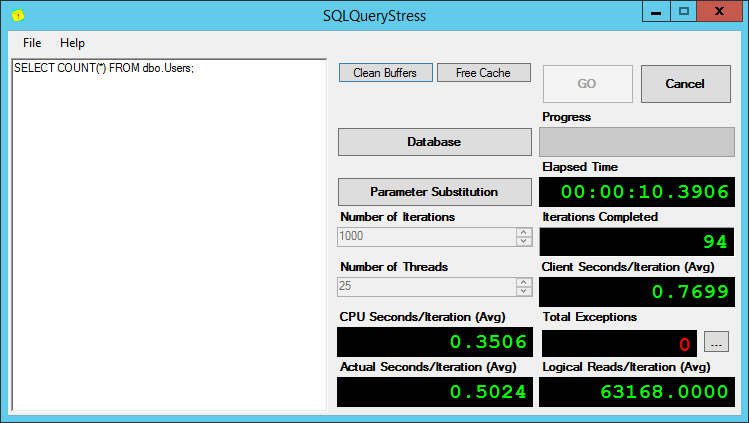
Instead, let’s use the neato open source tool SqlQueryStress (latest exe) to fake it. This is an oldie but goldie app that will run any one query thousands of times (or more) from dozens of sessions (or more), all from the comfort of your desktop:
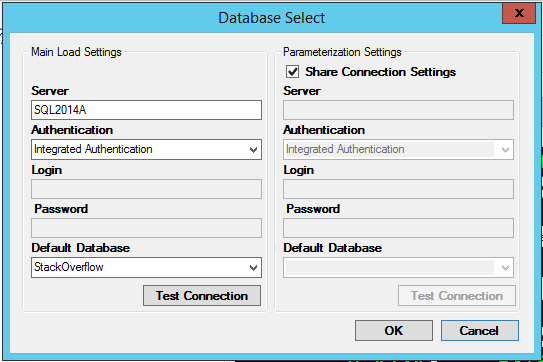
After you install it on your desktop (or a VM in the data center, whatever, just not the SQL Server you’re trying to load test), click the Database button to set up your connection string. In this instance, I’m pointing it at one of my Availability Groups, using Windows authentication. As soon as I set the server and auth methods, the database list gets populated so I can set my default database:
Then it’s time to pick the query to run.
But you want to test more than one query at a time, right? You want to test a variety of different queries running all at once.
Rather than calling a single query, call a “shell” stored procedure that runs other queries. Here’s how it works:
- Declare an integer, and set it to a random number
- Based on the mod of that number, run a stored procedure
(for example, if it’s divisible by 3, run sp_C,
else if it’s divisible by 2, run sp_B,
else run sp_A.)
Since SQLQueryStress will be calling this stored proc dozens of times at once, you’ll end up with a variety of different queries running simultaneously.
Let’s get a little more complex. Here’s what mine looks like for one of my query tuning demos:
|
1 2 3 4 5 6 7 8 9 10 11 12 13 14 15 16 17 18 19 20 |
CREATE PROCEDURE [dbo].[usp_RandomQ] WITH RECOMPILE AS SET NOCOUNT ON DECLARE @Id INT SELECT @Id = CAST(RAND() * 10000000 AS INT) IF @Id % 7 = 0 EXEC dbo.Refresh_ReportByVoteType ELSE IF @Id % 6 = 0 EXEC dbo.Refresh_ReportByBadge ELSE IF @Id % 5 = 0 EXEC dbo.GetBadgesDetails @Id ELSE IF @Id % 4 = 0 EXEC dbo.GetCommentsDetails @Id ELSE IF @Id % 3 = 0 EXEC dbo.GetPostsDetails @Id ELSE IF @Id % 2 = 0 AND @@SPID % 2 = 0 EXEC dbo.GetUsersDetails @Id ELSE EXEC dbo.GetVotesDetails @Id GO |
WITH RECOMPILE – I use this because I don’t want the usp_RandomQ stored procedure to show up in my execution plan stats. The work involved with building this execution plan isn’t significant, and it won’t be the largest part of my workload. (Oh, I wish it were.) All of the stored procs it calls will still show up in the plan cache, though.
@Id parameter – note that some of the stored procs take an @Id. For example, the stored proc GetBadgesDetails takes @Id, and uses that to look up a particular badge number’s details. This is handy because each of my stored procedures don’t have random number generators – they’re designed to mimic more real-world stored procs that have input values. If you wanted to get really fancy and test procs with lots of parameters, you’ll need to generate those in usp_RandomQ. You don’t want to hard-code the same values because then that relevant table data will end up getting cached in memory.
@@SPID – some of my workload queries simulate blocking. Due to the wonders of random number generation and very fast queries, if a blocking chain starts on any two sessions, then eventually the rest of the sessions will also call the stored proc that’s susceptible to blocking. After a few seconds, the only symptom my server will have is blocking – and that’s no fun. Instead, by using @@SPID %2 before calling GetVotesDetails (which gets blocked in my scenario), I make sure that no more than half of my sessions will get blocked at once.
The end result is beautiful – well, at least if you want something that looks like a production server getting hammered with all kinds of different queries:

I love using this quick-load-generation technique in our performance tuning classes. It’s a great way to show a server that looks like home, and gets students to figure out which queries are causing problems – and which ones are just harmless background noise.
Go get SQLQueryStress now, and get the usp_RandomQ scripts for the top queries from Data.StackExchange.com that hit the Stack Overflow database.
Free, 3× a week
Get my new posts by email
Three posts a week, plus a Monday roundup of the best database news from around the web.
This is awesome! I will download and test it right away!! Thanx a lot!!
You’re welcome. It’s a great tool.
Thanks, it looks great. I can’t wait to test it.
This is awesome tool ..
Just downloaded thsi tool, great, just what we need to run some stress testing. Thanks for this little gem!
The link no longer works, anyone got an update link or url where I can download this tool?
Ooo, unfortunately looks like he’s taken it down.
Can somebody re-upload it to codeplex or somewhere ?
Its on GitHub
https://github.com/ErikEJ/SqlQueryStress
Hey, I got it here.
http://sqlquerystress.software.informer.com/
Check out Adam’s recent post about SQLQueryStress:
http://sqlblog.com/blogs/adam_machanic/archive/2016/01/04/sqlquerystress-the-source-code.aspx
http://wayback.archive.org/web/20151028024821/http://www.datamanipulation.net/SQLQueryStress/sqlquerystress_0_9_7.msi
Hi Brent, Can you elaborate little more on your true skills like menu advice,interpretive dancing… Well I suppose your hidden true skills are Database Consulting,Correcting Mis-Interpreted SQL Query Optimizer
Cheers,
Basava
No, no, I’m not really all that good at consulting. Interpretive dance, though, I’m the bomb.
Great, thanks. What is the best way to kill all the sessions that were started from this tool?
I think I figured it out myself. Just Exited the tool and looks like that terminated all associated sessions.
Wow this website is great! Thanks a lot!
[…] wait types throughout the patching process. Once again the fine folks at Brent Ozar Unlimited had a blog post for this problem as well. Using SQLQueryStress, we can simulate a load on our SQL Server Instances […]
Do you have any performance load testing tools for Sybase ? Whether SqlQueryStress tool support Sybase ?
Uday – no, sorry, we’re not Sybase people.
[…] I am adapting a clever method highlighted by Brent Ozar for leveraging the tool to create a Production like performance load, however in my case I dont want it to be random but need it to be a repeatable test – see this article for more info – https://www.brentozar.com/archive/2015/05/how-to-fake-load-tests-with-sqlquerystress/ […]
Hi, I am trying to simulate 1000 concurrent users, but Im unable to run more than 4-6 instances of the sqlquerystress tool from my machine. And I dont have enough machines to simulate 1000 users like this. Are there any other tools I could use for testing concurrent users?
Sure, check out ostress.
Github release download is boken. Any alternatives for download?
I was not able to simulate many connections thru ‘SQLQuery stress’. I did paste above query in sql query stress box with 50 connections but only show 1.
Query:
CREATE PROCEDURE [dbo].[usp_RandomQ] WITH RECOMPILE
AS
SET NOCOUNT ON
DECLARE @Id INT
SELECT @Id = CAST(RAND() * 10000000 AS INT)
IF @Id % 7 = 0
EXEC dbo.Refresh_ReportByVoteType
ELSE IF @Id % 6 = 0
EXEC dbo.Refresh_ReportByBadge
ELSE IF @Id % 5 = 0
EXEC dbo.GetBadgesDetails @Id
ELSE IF @Id % 4 = 0
EXEC dbo.GetCommentsDetails @Id
ELSE IF @Id % 3 = 0
EXEC dbo.GetPostsDetails @Id
ELSE IF @Id % 2 = 0 AND @@SPID % 2 = 0
EXEC dbo.GetUsersDetails @Id
ELSE
EXEC dbo.GetVotesDetails @Id
GO
Dan – don’t put that query in SQLQueryStress. That query creates the stored procedure. Create the procedure (and the underlying stored procs as described in the post), and then in SQLQueryStress, just run the stored procedure with EXEC usp_RandomQ.
Also did that, it ran for 19 sec. and saw only 1 connection even though I have Number of Threads ’50’ !!
Can I run this against the AdventureWorks sample database? I need to simulate SQL load without having a real database to query.
Brian – sure, in the sense that you can write your own queries and build your own load test with it. It’s a set of tools – it’s not a prebuilt house. (I’m giving you a house above.)
Brent can you post the create script for the tables?
No, you can download the entire database. It’s free. Enjoy!
Brent where can I downloand the DB at?
Juan: https://www.brentozar.com/archive/2015/10/how-to-download-the-stack-overflow-database-via-bittorrent/
Brent any chance of getting the SP’s too?
Juan – yes, they’re linked in the post. Read the post really carefully. Thanks!
is it a bad practive to use this on production server ? should we limited this usage on tes environnement that have different server configuration than in production ?
Martine – Yes, it’s bad to lod year in production.
Hi Brent,
Could you explain more detail about result info? How to know our SQL proc good or bad?
Viet – sure, I talk a lot about that in my Fundamentals of Query Tuning and Mastering Query Tuning classes.
If your still hunting for the tool after going to all of these links. I finally found it in the Microsoft App Store.
I am not able to connect to my local database. When I clear Default Database and test connection, it is successful otherwise not.
OK, cool, good to know.
Very powerful concept. So much easier encapsulating the randomness in TSQL / usp_RandomQ sp versus doing it client side.
Thanks!
because in “WorkloadTools” its visible only the query “usp_RandomQ …” i wrote this powershell – Script:
Add-PSSnapin SqlServerCmdletSnapin100
Add-PSSnapin SqlServerProviderSnapin100
$timeout = New-TimeSpan -Minutes 10
$endTime = (Get-Date).Add($timeout)
do {
$rndv=get-random 10000000
if ($rndv % 12 -eq 0) {invoke-sqlcmd -server d10t105a “EXEC dbo.usp_Q3160 $rndv”}
elseif ($rndv % 11 -eq 0) {invoke-sqlcmd -server d10t105a “EXEC dbo.usp_Q36660 $rndv”}
elseif ($rndv % 10 -eq 0) {invoke-sqlcmd -server d10t105a “EXEC dbo.usp_Q466 $rndv”}
#elseif ($rndv % 9 -eq 0) {invoke-sqlcmd -server d10t105a “EXEC dbo.usp_Q6627 $rndv”}
elseif ($rndv % 8 -eq 0) {invoke-sqlcmd -server d10t105a “EXEC dbo.usp_Q6772 $rndv”}
elseif ($rndv % 7 -eq 0) {invoke-sqlcmd -server d10t105a “EXEC dbo.usp_Q6856 $rndv”}
elseif ($rndv % 6 -eq 0) {invoke-sqlcmd -server d10t105a “EXEC dbo.usp_Q7521 $rndv”}
elseif ($rndv % 5 -eq 0) {invoke-sqlcmd -server d10t105a “EXEC dbo.usp_Q8116 $rndv”}
elseif ($rndv % 4 -eq 0) {invoke-sqlcmd -server d10t105a “EXEC dbo.usp_Q947 $rndv”}
elseif ($rndv % 3 -eq 0) {invoke-sqlcmd -server d10t105a “EXEC dbo.usp_Q949 $rndv”}
elseif ($rndv % 2 -eq 0) {invoke-sqlcmd -server d10t105a “EXEC dbo.usp_Q952 $rndv”}
else {invoke-sqlcmd -server d10t105a “EXEC dbo.usp_Q975 $rndv”}
}
until ((Get-Date) -gt $endTime)
But the drawback is, that you must generate Workload without the features of SQLquerystress…