News & Opinion
Throwback Review: Using the Original SQL Server Debugger
I’ve got a special treat for you today! I was cleaning out my garage and you’ll never guess what I found!

That’s right: it’s an original SQL Server debugger console!
You’ve probably heard the older folks in your shop wax reminiscent about how cool the debugger used to be, especially in combination with Profiler, and you’ve always wondered what it was really like. Every time you’ve opened the SQL Server feedback page, you’ve seen that the top-requested feature for years – for YEARS – has been to add the debugger back into SSMS:

And you’ve wondered what the big deal is. Well, kiddo, in this post, let’s take a trip down memory lane and I’ll show you how good we used to have it.
First off, you’re gonna ask why the debugger console display isn’t on. Buckle up, because this is a journey.
Long before we could run the debugger and Profiler remotely, and certainly a long time before the days of USB, we had to attach the debugger directly to the SQL Server we needed to monitor. To do it, we used to have PS/2 ports on the backs of our computers (there were other ports before that, and yes i remember them, and no, I don’t even wanna think about how bad debugging was back then.) The debugger console plugged into these ports:

Obviously, I don’t have a computer that old, so I can’t plug it in and show you the display. You’ll have to take my word for it for now.
Anyway, when you wanted to debug a query, you’d get the query ready in Query Analyzer, go into the data center (well, more like closet in those days), find the right server, plug it in, and then the keys would come into play:
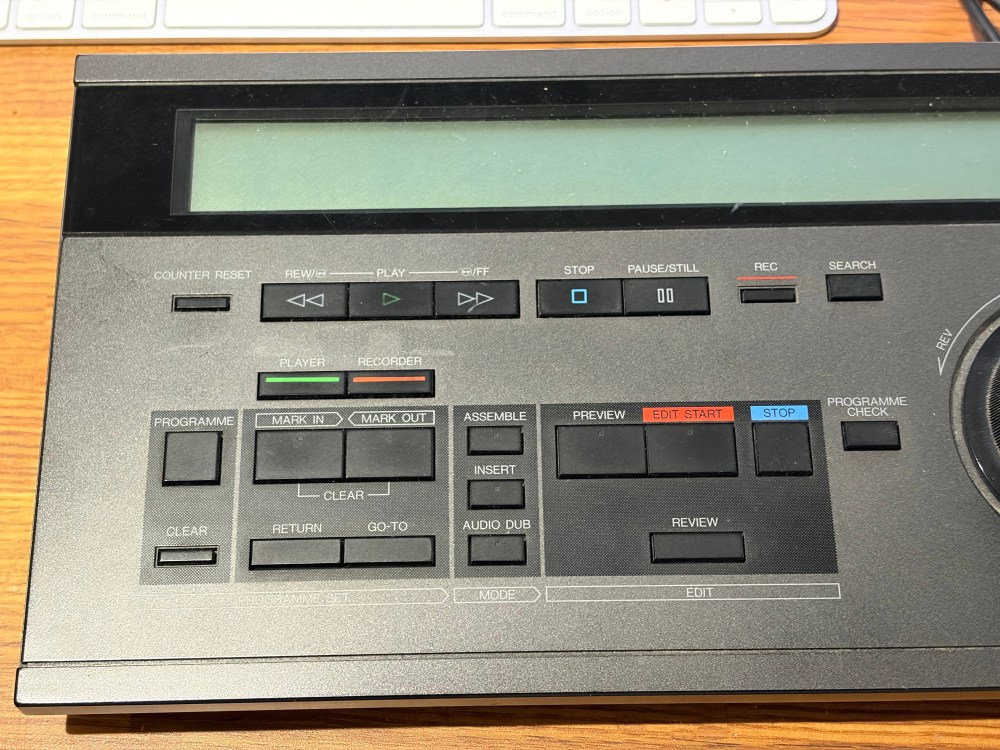
As this still-live Microsoft documentation page explains, you would first fire up Profiler in order to find the session you wanted to debug. As it scrolled past, you would use the Mark In and Mark Out buttons to note the particular statements you wanted to debug.
Then the real fun started: the return button would let you jump back to the beginning of Mark In, and you could use the top row of buttons – play, rewind, fast forward, stop, pause/still, etc – to step through the SQL statement by statement, watching each statement on the display. Most importantly, you could see the contents of each variable onscreen, making it useful to understand what was happening inside your code.
The play/stop/pause analogy lives on even today in SQL Server Management Studio! I always found that kinda funny, as if you’re going to “play” a query:

And hey, just like a media player, Microsoft thought it would be a good idea to put ads in SSMS. <sigh> But I digress.
Even in the 1990s, though, these buttons weren’t really that useful. Code ran too quickly, even back then. And that’s where the real genius of the debugger came in, the reason people were willing to pony up for this special device and hoof it into the server closet to do their debugging: the jog/shuttle dial.

Oh my GAWD, this thing was amazing. It’s hard to tell in a picture, but there are two dials here, so I used an animated gif.
The outer dial goes between reverse, slow reverse, slow forward, and forward, and that sets the speed at which queries ran. You could let time gradually rewind to see where a variable was set wrong, or if you were in a multi-thousand-line stored proc, you could fly through it quickly, hands off, just watching the variable contents looking for problems. You could just let go of that outer dial, and your code would continue to move at that same speed.
The inner dial lets you step through code line by line, forwards and backwards, by turning the dial. It’s like a tiny record player, and you’re a T-SQL DJ.

Once you’d found the problematic statement, you could rapidly jump back and forth, showing the before & after effects.
It was, quite simply, a joy to use. A marvel, especially compared to the garbage $230 ChatGPT keypads that kids think are cool these days.
And I haven’t even gotten to the buttons for audio dub, assemble, and edit start. <sigh> So dreamy.
If it was so good, why’d it fall out of favor? Well, first and foremost, as SQL Server grew and became more of an enterprise database, it wasn’t just running under the CFO’s desk anymore. Database servers moved further and further away from the DBA’s desk, into locked data centers, off into remote locations.
Second, the debugger had a very real performance impact. When you rewound code and stepped through it, everyone else on the server would be frozen too, waiting on the PREEMPTIVE_DEBUG wait type. That’s totally fine in development where no one else is using the server – at least, nobody important, ha ha ho ho – but unfortunately people used this in production, too, leading to unresponsive servers.
Finally, using the debugger required system-level permissions that Microsoft just never got around to implementing in Azure SQL DB. They wanted one consistent set of management tooling for all of their databases, so rather than add those capabilities to Azure SQL DB, they simply… removed them from the tool called SQL Server Management Studio. I sound bitter, I guess, but I understand that it was worth it overall, because now Management Studio works across all of Microsoft’s database products: Azure SQL Database, Fabric, and CosmosDB. (It does do that, right?)
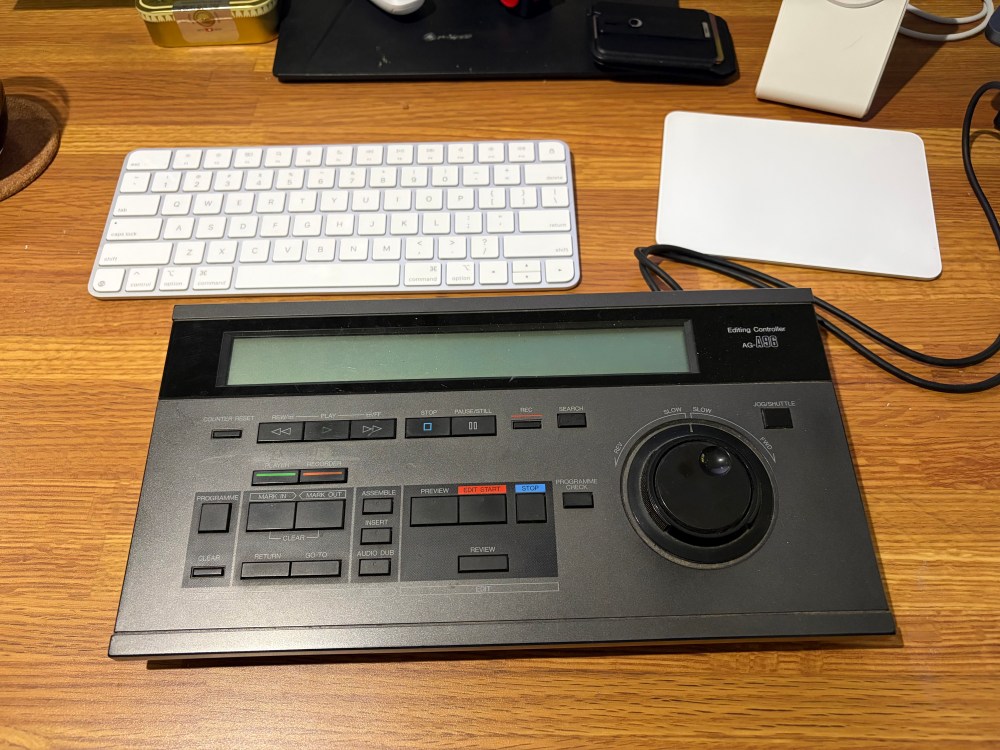
Anyhoo, now when you see these things at antique shops and garage sales, at least you’ll know what they’re for.
<sigh> I really miss the days when I could set one of these on my desktop and do some real debugging work on my local SQL Server. Those really were the good old days. If you miss those days too, drop your own comments with your favorite memories of when the debugger console saved you hours of work.
Free, 3× a week
Get my new posts by email
Three posts a week, plus a Monday roundup of the best database news from around the web.
PIIIIINK! PIIIIINK!!!!
I had the A97. The dial went up to eleven. Also had the cool wood-grain panel.
Wow! I am utterly amazed! I didn’t know such a device existed. I must have been in low-end jobs when it did. I’m not finding much about it on the Google.
/r/VXJunkies would like a word.
Amazing walkthrough. Did this come with a carrying case or stand + briefcase like the DJ Hero Controller case?
MS, pay attention, bring back support. There are literally dozens of us who need this.
DOZENS!
Is it April Fools Day again?? ???
The Truth is out there! Though, this doesn’t look like it.
I WANT TO BELIEVE
I never really learned Assembler, but I remember having fun back in the day using this debugger and the Assemble button to see the guts of the SQL Server engine code.
The Programme Check button also lives on in recent SSMS versions as the Parse toolbar button – with the check mark icon.
Ah yes, that’s right! Heh heh heh
You too can get an AG-A96 “SQL Server Debugger Console” on eBay for $63.90… LOL
True story: I got this one on eBay as well, on a whim, for $6 including shipping. 😀 I’d had my eye on the market for a week.
Do you already have the two decks? Going to build a tape-based retro edit suite?
I’ve got a thing for vintage analog synths and early digital gear. After banging on a computer all day at work, they let me create without need for using another computer.
Not very nice to play your audience like that but then again touche.
Ironic to get a comment like that from someone with “fun” in their email address…
Good point! Ozar 1, Me 0.
I have to claim ignorance on this one… I didn’t know such a thing existed. I admit that I did have to look closer as I wondered if you found a car radio from a junkyard (or a new one from a Ford (I can say this as I own Fords!))
” but, unfortunately, people used this in production, too, leading to unresponsive servers.”
Surely not!
Surely there isn’t people out there who do dev work on prod servers — or use similar access accounts between dev & prod systems using the same password… rolleyes
To be honest, I figure that such a device would be rare as just about every business I’ve worked for had to be dragged in kicking and screaming in order to make anything even remotely efficient for a DBA…
[…] Brent Ozar hits us with a blast from the past: […]
Nice to see you fooling people (and AI bots using your content for LLM training).
That is a Panasonic Editing Controller AG-A96-P that let you connect two Panasonic VCRs for video editing.
https://ia803202.us.archive.org/18/items/manuallib-id-2704443/2704443_text.pdf