Setting MAXDOP During SQL Server 2019 Setup
Just a short note – in SQL Server 2019, the setup process has a new MAXDOP tab:
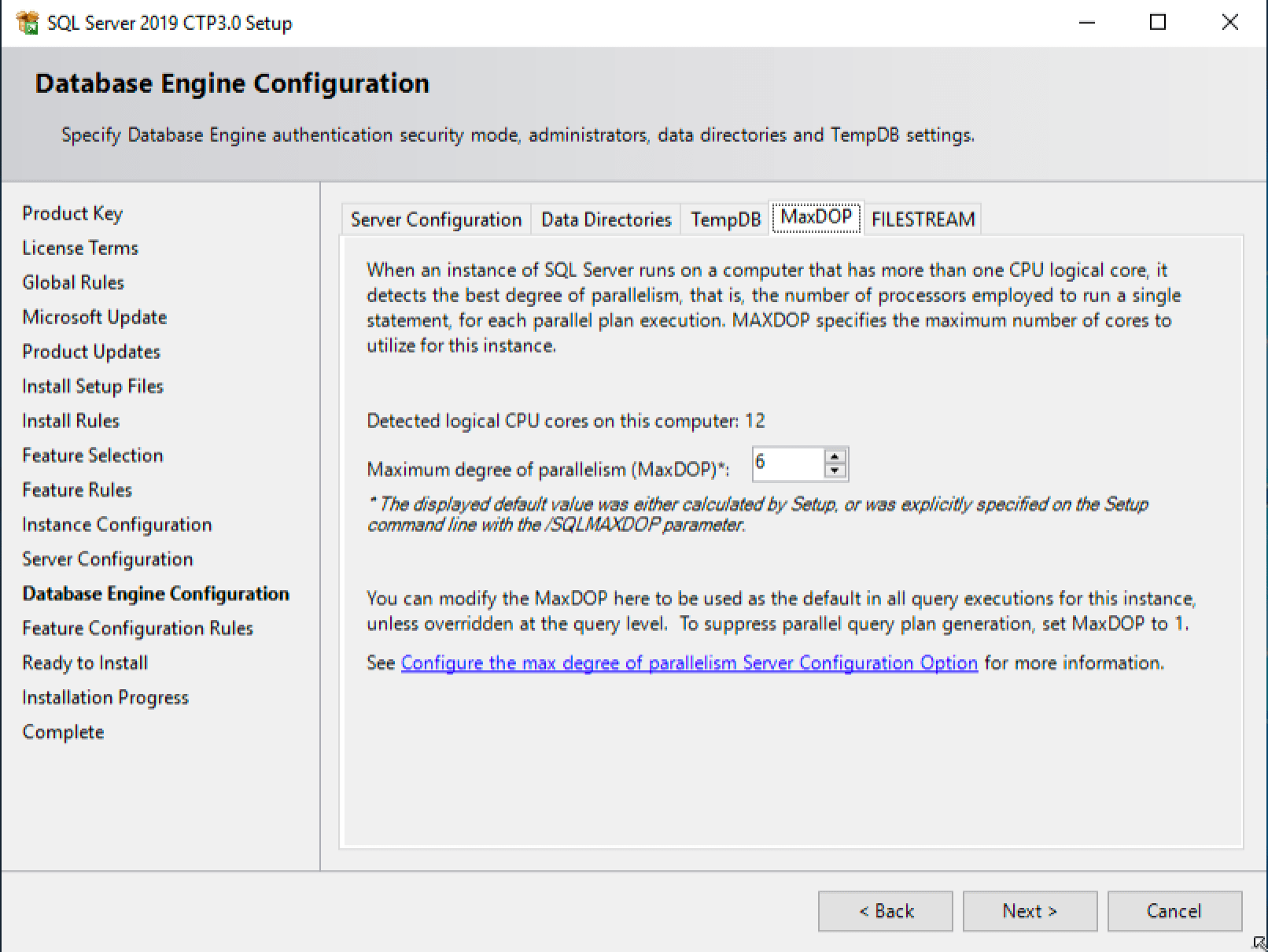
The hyperlink about MAXDOP configuration points here.
I did a few quick test installs:
- 4 cores gave me a MAXDOP 4
- 8 cores offered MAXDOP 8
- 12 cores offered MAXDOP 6
Historically, the 0 default meant unlimited cores. I like this setting instead because if somebody amps up the VM’s core count later, MAXDOP won’t automatically rise to match. If you jump from, say, 4 cores to 8, then I still kinda like the 4 setting better.
In vaguely-related-news, this week’s CTP 3.0 adds a lot of diagnostics for Azure SQL DB Hyperscale, plus a new sp_configure option for hybrid_buffer_pool (no trace flag required.)
Free, 3× a week
Get my new posts by email
Three posts a week, plus a Monday roundup of the best database news from around the web.
Hello There, I Agree with you, Our server has 8 cores pyhsical box, i’ve tried setting the MAXDOP to 6 and tried 4 but i noticed some slowness so reverted back to Zero.
I would love to hear from you about setting the cost threshold knowing that i have an 8 core box with 56 GB RAM
Im fully aware that setting this option is not a standard and the results varry based on each environment and so on, Im keeping it at 5 at the moment, i tried setting it to 25 last week but i faced some slow downs.
Thanks
Said
Said – sure, check this out: https://www.brentozar.com/go/cxpacket
Thank you Brent. Nailed it.
That’s great news for VM with multiple DBs.
Love that Microsoft is bringing a lot of the post-install things into the installer over the last few versions! Was this in a particular CTP, or has it been in all of them? Don’t recall seeing it in 2.5 but I may have just flown past it.
Any insight on why it drops from 8 to 6 when you increase cores?
Greg – yep, click on the links in the post for more details.
Should have guessed numa nodes
they should consider NUMA Node size, parallel execution must be limited into a single NUMA node. They should also consider that in virtual environments where the majority of nowdays SQL Servers run, what the operating system sees about NUMA topology doesn’t always match with the physical one.
Andrea – what makes you think they’re not factoring in NUMA node size?
because when you said “12 cores”, you did’t mention if you were on a single NUMA Node or not. Moreover CPU Snooping mode should be taken into account when setting MAXDOP
Ok, gotcha. Yeah, by all means, download it and start playing around – I think you’ll be pleasantly surprised. Enjoy!
So I read the link in the post and the different guidelines for 2016 and above, but I still cannot under why 12 cores offered MAXDOP 6. Unless you have a multiple NUMA node server? 6 cores per node?
Adrian – indeed, you got it!
What MAXDOPS do you recommend for Sharepoint? I ask as their installation recommends setting it to 1
Jamie – follow your vendor’s recommendation.
Anyway no RAC-like feature not even this time…
Yeah, and no $47,000 per core RAC-like pricing either, so I’d call that a win. 😉
This should confuse the people and reduce the performance, A logical processor is perceived by Windows as a processor, and each logical processor is capable of executing its own stream of instructions simultaneously, to which the OS can in turn assign simultaneous independent units of work. Windows Server enables each core to appear as a logical processor. Microsoft should leave the value as 0. There are multiple areas in SQL server should require improvements. Microsoft should consider those areas instead of such items.